QIAcuity EG PCR Kit

Zur Verwendung mit den QIAcuity digitalen PCR-Geräten

S_9797_dPCR_QIAcuity_EG_PCR_Kit

✓ Automatische Verarbeitung von Online-Bestellungen 24/7

✓ Sachkundiger und professioneller technischer und Produkt-Support

✓ Schnelle und zuverlässige (Nach-)Bestellung

QIAcuity EG PCR Kit (1 ml) icon_0368_ls_gen_eco_friendly-s

Kat.-Nr. / ID.   250111

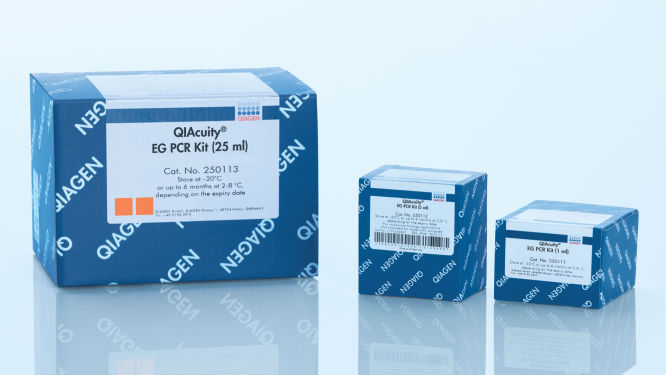
1 ml 3x konzentrierter QIAcuity EvaGreen Master-Mix, 2 x 1,9 ml Wasser
Volumen
1 ml
5 ml
25 ml
QIAcuity EG PCR Kit ist für molekularbiologische Anwendungen vorgesehen. Dieses Produkt ist nicht für die Diagnose, Prävention oder Behandlung einer Krankheit bestimmt.

✓ Automatische Verarbeitung von Online-Bestellungen 24/7

✓ Sachkundiger und professioneller technischer und Produkt-Support

✓ Schnelle und zuverlässige (Nach-)Bestellung

Eigenschaften

  • Für digitale PCR-Reaktionen auf Farbstoffbasis mit EvaGreen
  • 3x konzentrierter Master-Mix zum Laden von mehr Proben
  • Optimiert für den mikrofluidischen Einsatz mit QIAcuity Nanoplates
  • REACH-Konformität

Angaben zum Produkt

Das QIAcuity EG PCR Kit enthält einen 3x konzentrierten, gebrauchsfertigen Master-Mix, der für den mikrofluidischen Einsatz mit den QIAcuity Nanoplates optimiert ist. Das Kit steigert die Spezifität und Effizienz der farbstoffbasierten digitalen PCR und ermöglicht eine genaue Quantifizierungsanalyse. Der interkalierende Farbstoff EvaGreen bindet an Doppelstrang-DNA und erhöht die quantitative Genauigkeit der gDNA- und cDNA-Messungen auf den QIAcuity dPCR-Geräten.

Das Kit wird zusammen mit dem QIAcuity Digital PCR System und den QIAcuity Nanoplates eingesetzt.

Möchten Sie Näheres über das Produkt erfahren und von einem unserer dPCR-Spezialisten kontaktiert werden? Registrieren Sie sich hier, und wir werden uns umgehend mit Ihnen in Verbindung setzen.

Leistung

Überlegene Leistung
Die QIAcuity Master-Mixe für den EvaGreen-basierten Nachweis nutzen die neuesten Versionen der hochwertigen DNA-Polymerase von QIAGEN. Die einzigartige Kombination von QIAGENs proprietärer und bewährter Puffertechnologie, die für die Nanoplatten-Mikrofluidik optimiert wurde, mit der neuen QuantiNova DNA-Polymerase liefert äußerst beständige Ergebnisse hinsichtlich der Sensitivität, Reproduzierbarkeit und Effizienz.

Farbstoffbasierter Nachweis mit EvaGreen
Der spezielle Master-Mix im QIAcuity EG PCR Kit erlaubt die präzise Amplifikation und Quantifizierung doppelsträngiger DNA-Ziele. Hierzu gehört ein optimierter Referenzfarbstoff, der für die dPCR-Analyse und die Zählung auswertbarer Partitionen auf den Nanoplatten benötigt wird. EvaGreen liefert darüber hinaus bei gleichen Konzentrationen ein stärkeres Fluoreszenzsignal als SYBR Green und bietet maximale Amplifikationseffizienz, Spezifität und Sensitivität bei der dPCR.

Reaktionsstabilität von bis zu 100 Stunden
Die QIAcuity PCR-Mixe können bis zu 100 Stunden bei 30 °C gelagert werden, ohne dass dies die Leistung der nachfolgenden Reaktionen beeinträchtigt. Die auch nach längerer Lagerung ohne Kühlmittel bei Raumtemperatur bestehende hervorragende Stabilität ermöglicht den Einsatz des QIAcuity EG PCR Kit für die Arbeit mit Hochdurchsatzreaktionen und Plattenstapeln.

Prinzip

Durch seinen neuartigen, Antikörper-vermittelten Hot-Start-Mechanismus bietet das QIAcuity EG PCR Kit cDNA- und gDNA-Analysen höchster Spezifität. Bei niedrigen Temperaturen wird die QuantiNova-DNA-Polymerase durch den QuantiNova-Antikörper und QuantiNova Guard, ein neuartiges, den Komplex stabilisierendes Additiv, in einem inaktiven Zustand gehalten. Dies verbessert die Stringenz des Hot-Starts und verhindert die Verlängerung von unspezifisch gebundenen Primern und Primer–Dimeren. Innerhalb von 2 Minuten nach Temperaturerhöhung auf 95 °C werden der QuantiNova-Antikörper und QuantiNova Guard denaturiert und die QuantiNova-DNA-Polymerase wird aktiviert, was die PCR-Amplifikation ermöglicht.

Das Prinzip der dPCR-Reaktion in den Nanoplatten finden Sie hier beschrieben.

Verfahren

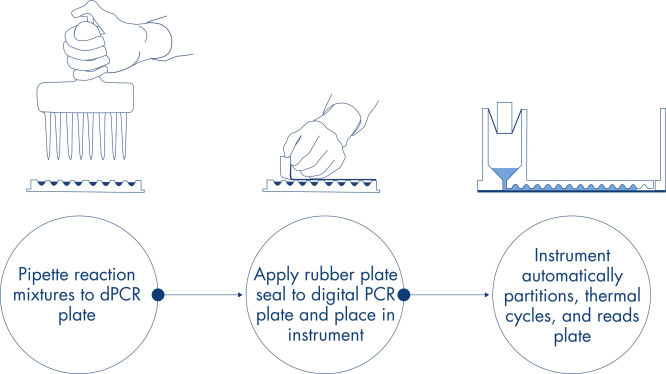
Genau wie bei qPCR-Experimenten umfasst die Probenvorbereitung den Transfer von Master-Mix, Sonden und Primern in eine 96- oder 24-Well-Nanoplatte, gefolgt von der Zugabe der Proben. Das System integriert Partitionierung, Thermocycling und Bildgebung in nur einem Vollautomaten, der den Benutzer in weniger als 2 Stunden von der Probe zum Ergebnis führt. Mit der Software Suite lassen sich Auswertungen durchführen, die die Konzentration der Zielsequenz in Kopien pro Mikroliter sowie Qualitätskontrollen wie positive Proben und NTC liefern. Diese Auswertung kann auch auf Remote-Computer innerhalb desselben lokalen Netzwerks (LAN) ausgedehnt werden.

Anwendungen

Im Zusammenspiel mit dem QIAcuity Digital PCR System und den QIAcuity Nanoplates ermöglicht das QIAcuity EG PCR Kit die quantitative Analyse von cDNA-Zielen und gDNA für den Einsatz in Anwendungen wie:

  • Nachweis seltener Mutationen
  • Auswertung der Variation der Kopienzahl
  • Genexpressionsanalyse
  • Pathogennachweis
  • Genotypisierung
  • miRNA-Forschung

Ergänzende Daten und Abbildungen

Ressourcen

Brochures and Guides (2)
Kit Handbooks (1)
For highly sensitive detection of miRNA using EvaGreen
Operating Software (10)
For Version 1.0

Version 2.1

For Version 2
QIAcuity Control Software
REFERENCE (405.8MB)
Download

Version 2.1


Beside of improvements and bug fixes, the new features mainly address the GMP requirements by offering additional support for 21 CFR part 11 compliance and get the software ready for future Nanoplate support.

For more information, please refer to the Release Note: QIAcuity Instrument Control Software, Version 2.1.

SHA1 checksum: 0DD41A8DE46D10E81F538ACB71AC184170D39FE0

Version 3.2

The QIAcuity Control Software is an integral part of the QIAcuity instrument. It offers a GUI (graphical user interface) for basic functionalities such as plate setup, changing the order of plates to be processed, and monitoring the status of runs in real time. After a run is completed, the data are stored on the instrument’s memory and are sent to the connected QIAcuity Software Suite for analysis.

The QIAcuity instrument CSW version 3.2 has been improved with enhanced error handling to prevent subsequent errors. Furthermore, a bug effecting to operate owned plates for users with the role technician or group leader has been fixed.


Detailed information about the QIAcuity Control Software 3.2 is available in the Release Note, which can also be downloaded under section Software Release Notes.

Note: The latest CSW version 3.2 is only compatible with the Software Suite version 3.2. If only one software component is updated, no connection between the Software Suite and the CSW can be established.

Important: Please follow the instructions provided in the QIAcuity User Manual for software version 3.2 and in the Release Note.

It is strongly recommended to update the QIAcuity Software Suite first before proceeding with the QIAcuity Control Software!

Note: After clicking reboot during CSW upgrade or change of Suite connection, the login screen may appear for short period. Please ignore it and wait for the QIAcuity instrument to shut down and restart itself.

Please contact QIAGEN Technical Services if you are unsure and require technical support.

SHA256 checksum: D23713C8F1C0D6D67048A465FECF8825DBB3D4D1C6CB8C1E0B6753EE053E6B81


Version 2.1

For Version 2.0
For Version 1.2
QIAcuity Control Software
SOFTWARE (401.7MB)
Download
Version 2.0

The QIAcuity Control Software is an integral part of the QIAcuity instrument. It offers a GUI (graphical user interface) for basic functionalities such as plate setup, changing the order of plates to be processed, and monitoring the status of runs in real time. After a run is completed, the data are stored on the instrument’s memory and are sent to the connected QIAcuity Software Suite for analysis

Besides system stability and performance reliability improvements, this new version of the control software offers advanced user management and audit trail functionalities. Together with the QIAcuity Software Suite 2.0, the QIAcuity systems now support 21 CFR Part 11 regulations for users working under GMP.

Detailed information is available in the Release Note, which can also be downloaded under section “Operating Software”.

Note: Upgrading the QIAcuity Control Software to version 2.0 will require upgrading the QIAcuity Software Suite to version 2.0.

Important: Please follow the instructions provided in the QIAcuity User Manual for software version 2.0. It is strongly recommended to update the QIAcuity Software Suite first before proceeding with the QIAcuity Control Software!
QIAcuity Control Software
SOFTWARE (263.6MB)
Download
Version 1.0

The QIAcuity Control Software is an integral part of the QIAcuity instrument. It offers a GUI (graphical user interface) for basic functionalities such as plate setup, changing the order of plates to be processed, and monitoring the status of runs in real time. After a run is completed, the data are stored on the instrument’s memory and are sent to the connected QIAcuity Software Suite for analysis.

This new version of the control software includes system stability and performance reliability improvements. We highly recommend to update the control software of your QIAcuity instrument.

Note: The installation requires approximately 90 minutes.
Safety Data Sheets (1)
Download Safety Data Sheets for QIAGEN product components.
Certificates of Analysis (1)

FAQ

Is it possible to change voltage set-up from 110V to 230V on the QIAcuity instruments?

This is not needed. The QIAcuity is equipped with a flexible power supply technology and operates within a range of 100–240V AC, 50/60 Hz, 1500 VA (max). 

FAQ-3761
Can I see error codes on the instrument touchscreen?

The instrument software GUI shows error codes including a description and information how to resolve the error. The instrument touchscreen shows an alarm icon in the upper right corner that turns red in case of an instrument failure. Accessing the System Status in the Tool tab allows users to clear errors. Rebooting of the instrument is required to complete the removal of the error.  Please do not skip this step. You may always contact QIAGEN Technical Services in case of any question. 

FAQ-3763
What is the scope of a regular maintenance of the QIAcuity?

The user manual contains instructions on how to perform a regular cleaning and decontamination, and how to replace air filters on the QIAcuity instruments. A regular maintenance reduces the dust in the instrument and therefore minimizes the presence of dust particles on the nanoplate, which might interfere with the plate analysis.

FAQ-3765
What is the impact of not applying the latest VPF? Can I reanalyze previously obtained results after installing the latest VPF?

If you had run a nanoplate for which the installed VPF misses the specific factor, the software will notify you. If you then analyze without the specific VPF, the impact depends on the variation of the partition volume of the new Nanoplate batch compared to the latest. Typically this variation is ±6–7% (approx. 5% CV over the entire plate). The analysis may be repeated after updating the VPF file. After installing the latest VPF and re-analysis of the run, a copy of the plate is generated in the QIAcuity Software Suite including the new results. 

FAQ-3769
Can I see on the QIAcuity Software Suite report file if the VPF (Volume Precision Factor) has been used or not?

Yes, the report includes a notification if the matching VPF was missing and, therefore, not applied to the analysis. If the matching VPF was applied there is no notification on the report. 

FAQ-3770
Is it necessary to reanalyze a plate with VPF (Volume Precision Factor) that was already processed using a QIAcuity instrument that was purchased in 2020?

If you had analyzed your nanoplates without VFP, the impact depends on the variation of the partition volume of the new nanoplate batch compared to the latest. The VPF reduces the CV from approximately 5% to 2%. We recommend to reanalyze results in case the data originated from different wells (e.g., copy number variations or gene expression data sets for which the reference sample was measured in a different well). Results obtained across different plates should also be r-analyzed. A reanalysis is not required for assay data that were analyzed within the same well (e.g., mutation rate determination using two channels within the same well).

FAQ-3771
Can I prepare a dPCR reaction directly in QIAcuity Nanoplate?

A standard PCR plate is required to set up dPCR reaction before transferring it to the nanoplate to ensure a proper mixing of the reaction mix before partitioning. 

FAQ-3774
Can I use a custom master mix instead of a QIAGEN master mix?

QIAGEN master mixes are optimized for nanoplate microfluidics and are recommended to be used with our dPCR system. They also include an optimized reference dye required for proper analysis.

FAQ-3777
How to prepare DNA prior to dPCR?

All DNA samples used in reaction mixes should show similar quality and quantity, which can easily be assessed using UV spectrophotometry. DNA samples with an average length of ≥20 kb (e.g., genomic DNA purified via spin column with silica membrane) should be fragmented by restriction digestion before partitioning. Enzymatic fragmentation of larger DNA ensures an even distribution of template throughout the QIAcuity Nanoplate, which in turn leads to an accurate and precise quantification.

FAQ-3778
What are the storage conditions and expiry date of QIAcuity consumables?

The QIAcuity Probe PCR Kit should be stored immediately upon receipt at –30 to –15°C in a constant-temperature freezer and protected from light. The QIAcuity Probe PCR master mix can also be stored protected from light at 2–8°C. Components are stable for 12 months, unless otherwise indicated on the label. 
The QIAcuity EG PCR Kit should be stored immediately upon receipt at –30 to –15°C in a constant-temperature freezer and protected from light. The QIAcuity EG PCR master mix can also be stored protected from light at 2–8°C. Components are stable for 6 months, unless otherwise indicated on the label. 
The QIAcuity Nanoplates does not have expiry date and are stable for at least 1 year when stored at RT. 

FAQ-3780
Can I use the QIAcuity Nanoplate in more than one runs?

The plate is designed for a single use run. For example, even if only 30 samples are loaded into the 96-well plate, a whole plate will be sealed by the roller. It can't be unsealed and used for another run. The QIAcuity Software won’t allow to set up a separate experiment for the same nanoplate to avoid that previously processed plates being not partitioned a second time.

FAQ-3781
Can I optimize a dPCR assay on the QIAcuity using gradient temperature?

An essential temperature gradient functionality was introduced with software version 2.5. When updating older software versions to 2.5, each QIAcuity instrument will offer the temperature gradient and may be used to find the best cycling temperature for new dPCR assays. When running a QIAcuity Four or a QIAcuity Eight, all plates may have their own temperature profile, including the option for a temperature gradient.

FAQ-3783
What is the VPF (Volume Precision Factor)?

The VPF provides a set of well-specific and molding form-specific factors used to specify the exact reaction volume of a nanoplate, thus increasing the concentration calculation of each well. 

FAQ-3784
When and how often do I need a new VPF (Volume Precision Factor)?

 In general, nanoplates provide partitions of fixed sizes that enable a very precise way of sample concentration calculation. If a new molding form is used for nanoplate manufacturing, potential variation of partition sizes can be addressed by applying the molding form-specific VPF. Thus, each time a new molding form is used, a new VPF is created and made available. Currently, the VPF is updated once every 3–6 months.

FAQ-3785
Is a standard curve needed in dPCR?

In dPCR we measure the absolute concentration of targets at endpoint reaction. Concentrations of unknowns can be determined based on dPCR results observed (number of negatives, number of positives, and partition volume analyzed).

FAQ-3786