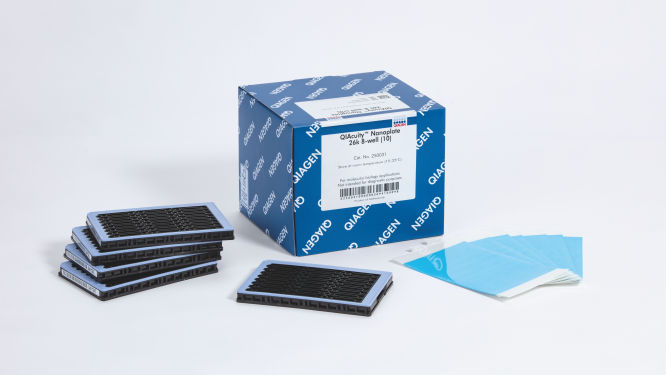
QIAcuity Nanoplates y accesorios

Para uso con los instrumentos de PCR digital QIAcuity

S_1220_3_LS_dPCR_Nanoplate_26k_8well

✓ Procesamiento automático sin interrupción de pedidos en línea

✓ Servicio técnico y para productos experto y profesional

✓ Realización y repetición de pedidos rápidas y fiables

QIAcuity Nanoplate 26k 8-well (10)

N.º de cat. / ID.   250031

10 QIAcuity Nanoplate 26k 8-well, 11 Nanoplate Seals
DKK2145.00
Iniciar sesión Para ver los precios de su cuenta.
Product TypeAccessories
QIAcuity Nanoplate
Nanoplate Seals
Nanoplate Tray
Nanoplate Adapter
Particiones por pocillo
26k
8.5k
Número de pocillos
8
24
QIAcuity Nanoplates y accesorios están concebidos para su uso en aplicaciones de biología molecular. Estos productos no están concebidos para el diagnóstico, la prevención ni el tratamiento de enfermedades.

✓ Procesamiento automático sin interrupción de pedidos en línea

✓ Servicio técnico y para productos experto y profesional

✓ Realización y repetición de pedidos rápidas y fiables

Características

  • Cuatro nanoplacas para diferentes necesidades de aplicación
  • Hasta 8500 o 26 000 divisiones por pocillo
  • Formato SBS

Detalles del producto

Las QIAcuity Nanoplates son placas de PCR digital de microfluidos que permiten analizar 8, 24 o 96 muestras con un máximo de 8500 o 26 000 divisiones por pocillo. Las cuatro nanoplacas están diseñadas para utilizarse en los instrumentos de dPCR QIAcuity.

Las nanoplacas solo pueden utilizarse con el QIAcuity Digital PCR System. Use el QIAcuity Nanoplate Adapter dedicado al llevar a cabo la configuración automatizada de PCR y manipulación de líquido en una QIAcuity Nanoplate con el sistema QIAgility. Una vez hecho esto, cargue la placa en el QIAcuity Digital PCR System para la reacción de dPCR.

¿Le gustaría obtener más información sobre el producto y que uno de nuestros especialistas en dPCR se ponga en contacto con usted? Regístrese aquí y nos pondremos en contacto con usted en breve.

Rendimiento

Estas placas están especialmente diseñadas para utilizarse con reacciones de PCR digital en los instrumentos QIAcuity. QIAGEN ofrece cuatro tipos de nanoplacas, todas con formato SBS, pero con diferentes especificaciones para distintas necesidades de aplicación.


Características y especificaciones de las nanoplacas
Tipo Color del bastidor Especificaciones Aplicaciones
Nanoplate 26K 8-well Azul claro

8 pocillos × aprox. 26 000 divisiones 

Reacción de dPCR de 40 µl por pocillo

Detección de mutaciones poco frecuentes, 
biopsia líquida, análisis de 
expresión génica, 
detección de microrganismos patógenos, etc. 
Nanoplate 26K 24-well Azul

24 pocillos × aprox. 26 000 divisiones

Reacción de dPCR de 40 µl por pocillo

Detección de mutaciones poco frecuentes,
biopsia líquida, análisis de
expresión génica,
detección de microrganismos patógenos, etc.
Nanoplate 8.5K 24-well Blanco

24 pocillos × aprox. 8500 divisiones

Reacción de dPCR de 12 µl por pocillo

Análisis de
variación en el número de copias,
análisis de expresión génica,
cuantificación de la genoteca de NGS,
detección de modificaciones del genomas, etc.
Nanoplate 8.5K 96-well Gris

96 pocillos × aprox. 8500 divisiones

Reacción de dPCR de 12 µl por pocillo

Principio

En solo 3 simples pasos, puede obtener el resultado de dPCR que desea en menos de dos horas: pipetee y cargue, realice el experimento y analice los resultados. El principio de la reacción de dPCR en las nanoplacas se describe aquí.

Procedimiento

Al igual que en los experimentos de qPCR, la preparación de las muestras incluye la transferencia de mezcla maestra, sondas y cebadores a una nanoplaca de 8, 24 o 96 pocillos, seguida de la adición de las muestras. El sistema integra funciones de división, termociclado y obtención de imágenes en un solo instrumento completamente automatizado que permite a los usuarios obtener los resultados de las muestras en menos de 2 horas. Es posible realizar un análisis en el paquete de software, que proporciona la concentración en copias por microlitro de la secuencia de blancos y también para el control de calidad como muestras positivas o NTC. Este análisis también se puede extender a ordenadores remotos dentro de la misma red de área local (LAN).

Aplicaciones

Las QIAcuity Nanoplates, junto con el QIAcuity Digital PCR System y los QIAcuity PCR kits posibilitan las aplicaciones de PCR digital, entre las que se incluyen:

  • Detección de mutaciones poco frecuentes
  • Análisis de variación en el número de copias
  • Análisis de expresión génica
  • Detección de microrganismos patógenos
  • Genotipado
  • Investigación sobre miARN
  • Terapia celular y génica
  • Cuantificación del ADN residual
  • Control de aguas residuales

Recursos

Protocols (5)
Here we demonstrate how to optimize your assays on a microfluidic nanoplate-based digital PCR system, the QIAcuity, and provide recommendations for a seamless transfer. Moreover, the QIAcuity dPCR workflow is very similar to qPCR.
Here we compared the performance of qPCR and the nanoplate dPCR techniques. The digital PCR method on the QIAcuity significantly improved precision when measuring copy number states and sensitivity of mutation detection through absolute quantification and reduced standard error. This is advantageous in various applications, including copy number variation analysis, small fold-change and rare mutation detection.
Here we report the use of saliva samples in combination with dPCR as a suitable alternative to screen for individuals infected with SARS-CoV-2.
The QIAcuity digital PCR system combined with the QIAcuity One-Step Viral RT-PCR Kit enables precise detection and quantitation of vector-borne viruses in mosquitoes. The results presented in this comparison study showed that digital PCR is a powerful tool for absolute quantitation of low abundant targets and is a more reliable detection method than qPCR. Multiplexing allows detection and quantitation of multiple targets in a single reaction more efficiently by increasing sample throughput at a reduced cost per target.
Here we provide an integrated rAAV genome titer method using the QIAcuity Digital PCR (dPCR) System with detailed parameters for high assay performance. Using this optimized method for pre-PCR handling of in-process rAAV samples, the results demonstrated that QIAcuity dPCR system generates the same level of accuracy and precision as the current gold standard ddPCR system but with much faster sample-to-result times (2 hours vs 7 hours) and higher overall throughput and scalability.
Safety Data Sheets (1)
Download Safety Data Sheets for QIAGEN product components.
Certificates of Analysis (1)
Brochures and Guides (1)
Fast. Scalable. Reliable.
Operating Software (10)
For Version 1.0

Version 2.1

For Version 2
QIAcuity Control Software
REFERENCE (405.8MB)
Download

Version 2.1


Beside of improvements and bug fixes, the new features mainly address the GMP requirements by offering additional support for 21 CFR part 11 compliance and get the software ready for future Nanoplate support.

For more information, please refer to the Release Note: QIAcuity Instrument Control Software, Version 2.1.

SHA1 checksum: 0DD41A8DE46D10E81F538ACB71AC184170D39FE0

Version 3.2

The QIAcuity Control Software is an integral part of the QIAcuity instrument. It offers a GUI (graphical user interface) for basic functionalities such as plate setup, changing the order of plates to be processed, and monitoring the status of runs in real time. After a run is completed, the data are stored on the instrument’s memory and are sent to the connected QIAcuity Software Suite for analysis.

The QIAcuity instrument CSW version 3.2 has been improved with enhanced error handling to prevent subsequent errors. Furthermore, a bug effecting to operate owned plates for users with the role technician or group leader has been fixed.


Detailed information about the QIAcuity Control Software 3.2 is available in the Release Note, which can also be downloaded under section Software Release Notes.

Note: The latest CSW version 3.2 is only compatible with the Software Suite version 3.2. If only one software component is updated, no connection between the Software Suite and the CSW can be established.

Important: Please follow the instructions provided in the QIAcuity User Manual for software version 3.2 and in the Release Note.

It is strongly recommended to update the QIAcuity Software Suite first before proceeding with the QIAcuity Control Software!

Note: After clicking reboot during CSW upgrade or change of Suite connection, the login screen may appear for short period. Please ignore it and wait for the QIAcuity instrument to shut down and restart itself.

Please contact QIAGEN Technical Services if you are unsure and require technical support.

SHA256 checksum: D23713C8F1C0D6D67048A465FECF8825DBB3D4D1C6CB8C1E0B6753EE053E6B81


Version 2.1

For Version 2.0
For Version 1.2
QIAcuity Control Software
SOFTWARE (401.7MB)
Download
Version 2.0

The QIAcuity Control Software is an integral part of the QIAcuity instrument. It offers a GUI (graphical user interface) for basic functionalities such as plate setup, changing the order of plates to be processed, and monitoring the status of runs in real time. After a run is completed, the data are stored on the instrument’s memory and are sent to the connected QIAcuity Software Suite for analysis

Besides system stability and performance reliability improvements, this new version of the control software offers advanced user management and audit trail functionalities. Together with the QIAcuity Software Suite 2.0, the QIAcuity systems now support 21 CFR Part 11 regulations for users working under GMP.

Detailed information is available in the Release Note, which can also be downloaded under section “Operating Software”.

Note: Upgrading the QIAcuity Control Software to version 2.0 will require upgrading the QIAcuity Software Suite to version 2.0.

Important: Please follow the instructions provided in the QIAcuity User Manual for software version 2.0. It is strongly recommended to update the QIAcuity Software Suite first before proceeding with the QIAcuity Control Software!
QIAcuity Control Software
SOFTWARE (263.6MB)
Download
Version 1.0

The QIAcuity Control Software is an integral part of the QIAcuity instrument. It offers a GUI (graphical user interface) for basic functionalities such as plate setup, changing the order of plates to be processed, and monitoring the status of runs in real time. After a run is completed, the data are stored on the instrument’s memory and are sent to the connected QIAcuity Software Suite for analysis.

This new version of the control software includes system stability and performance reliability improvements. We highly recommend to update the control software of your QIAcuity instrument.

Note: The installation requires approximately 90 minutes.
User Manuals (2)
White Papers (1)

Preguntas frecuentes

Is it possible to change voltage set-up from 110V to 230V on the QIAcuity instruments?

This is not needed. The QIAcuity is equipped with a flexible power supply technology and operates within a range of 100–240V AC, 50/60 Hz, 1500 VA (max). 

FAQ-3761
Can I see error codes on the instrument touchscreen?

The instrument software GUI shows error codes including a description and information how to resolve the error. The instrument touchscreen shows an alarm icon in the upper right corner that turns red in case of an instrument failure. Accessing the System Status in the Tool tab allows users to clear errors. Rebooting of the instrument is required to complete the removal of the error.  Please do not skip this step. You may always contact QIAGEN Technical Services in case of any question. 

FAQ-3763
What is the scope of a regular maintenance of the QIAcuity?

The user manual contains instructions on how to perform a regular cleaning and decontamination, and how to replace air filters on the QIAcuity instruments. A regular maintenance reduces the dust in the instrument and therefore minimizes the presence of dust particles on the nanoplate, which might interfere with the plate analysis.

FAQ-3765
What is the impact of not applying the latest VPF? Can I reanalyze previously obtained results after installing the latest VPF?

If you had run a nanoplate for which the installed VPF misses the specific factor, the software will notify you. If you then analyze without the specific VPF, the impact depends on the variation of the partition volume of the new Nanoplate batch compared to the latest. Typically this variation is ±6–7% (approx. 5% CV over the entire plate). The analysis may be repeated after updating the VPF file. After installing the latest VPF and re-analysis of the run, a copy of the plate is generated in the QIAcuity Software Suite including the new results. 

FAQ-3769
Can I see on the QIAcuity Software Suite report file if the VPF (Volume Precision Factor) has been used or not?

Yes, the report includes a notification if the matching VPF was missing and, therefore, not applied to the analysis. If the matching VPF was applied there is no notification on the report. 

FAQ-3770
Is it necessary to reanalyze a plate with VPF (Volume Precision Factor) that was already processed using a QIAcuity instrument that was purchased in 2020?

If you had analyzed your nanoplates without VFP, the impact depends on the variation of the partition volume of the new nanoplate batch compared to the latest. The VPF reduces the CV from approximately 5% to 2%. We recommend to reanalyze results in case the data originated from different wells (e.g., copy number variations or gene expression data sets for which the reference sample was measured in a different well). Results obtained across different plates should also be r-analyzed. A reanalysis is not required for assay data that were analyzed within the same well (e.g., mutation rate determination using two channels within the same well).

FAQ-3771
Can I prepare a dPCR reaction directly in QIAcuity Nanoplate?

A standard PCR plate is required to set up dPCR reaction before transferring it to the nanoplate to ensure a proper mixing of the reaction mix before partitioning. 

FAQ-3774
Can I use a custom master mix instead of a QIAGEN master mix?

QIAGEN master mixes are optimized for nanoplate microfluidics and are recommended to be used with our dPCR system. They also include an optimized reference dye required for proper analysis.

FAQ-3777
How to prepare DNA prior to dPCR?

All DNA samples used in reaction mixes should show similar quality and quantity, which can easily be assessed using UV spectrophotometry. DNA samples with an average length of ≥20 kb (e.g., genomic DNA purified via spin column with silica membrane) should be fragmented by restriction digestion before partitioning. Enzymatic fragmentation of larger DNA ensures an even distribution of template throughout the QIAcuity Nanoplate, which in turn leads to an accurate and precise quantification.

FAQ-3778
What are the storage conditions and expiry date of QIAcuity consumables?

The QIAcuity Probe PCR Kit should be stored immediately upon receipt at –30 to –15°C in a constant-temperature freezer and protected from light. The QIAcuity Probe PCR master mix can also be stored protected from light at 2–8°C. Components are stable for 12 months, unless otherwise indicated on the label. 
The QIAcuity EG PCR Kit should be stored immediately upon receipt at –30 to –15°C in a constant-temperature freezer and protected from light. The QIAcuity EG PCR master mix can also be stored protected from light at 2–8°C. Components are stable for 6 months, unless otherwise indicated on the label. 
The QIAcuity Nanoplates does not have expiry date and are stable for at least 1 year when stored at RT. 

FAQ-3780
Can I use the QIAcuity Nanoplate in more than one runs?

The plate is designed for a single use run. For example, even if only 30 samples are loaded into the 96-well plate, a whole plate will be sealed by the roller. It can't be unsealed and used for another run. The QIAcuity Software won’t allow to set up a separate experiment for the same nanoplate to avoid that previously processed plates being not partitioned a second time.

FAQ-3781
Can I optimize a dPCR assay on the QIAcuity using gradient temperature?

An essential temperature gradient functionality was introduced with software version 2.5. When updating older software versions to 2.5, each QIAcuity instrument will offer the temperature gradient and may be used to find the best cycling temperature for new dPCR assays. When running a QIAcuity Four or a QIAcuity Eight, all plates may have their own temperature profile, including the option for a temperature gradient.

FAQ-3783
What is the VPF (Volume Precision Factor)?

The VPF provides a set of well-specific and molding form-specific factors used to specify the exact reaction volume of a nanoplate, thus increasing the concentration calculation of each well. 

FAQ-3784
When and how often do I need a new VPF (Volume Precision Factor)?

 In general, nanoplates provide partitions of fixed sizes that enable a very precise way of sample concentration calculation. If a new molding form is used for nanoplate manufacturing, potential variation of partition sizes can be addressed by applying the molding form-specific VPF. Thus, each time a new molding form is used, a new VPF is created and made available. Currently, the VPF is updated once every 3–6 months.

FAQ-3785
Is a standard curve needed in dPCR?

In dPCR we measure the absolute concentration of targets at endpoint reaction. Concentrations of unknowns can be determined based on dPCR results observed (number of negatives, number of positives, and partition volume analyzed).

FAQ-3786