Nanoplaques et accessoires QIAcuity

Pour utilisation avec les instruments de PCR numérique QIAcuity

S_1220_3_LS_dPCR_Nanoplate_26k_8well

✓ Traitement automatique des commandes en ligne 24 h/24 7 j/7

✓ Assistance technique et produits pertinente et professionnelle

✓ Commande (ou réapprovisionnement) rapide et fiable

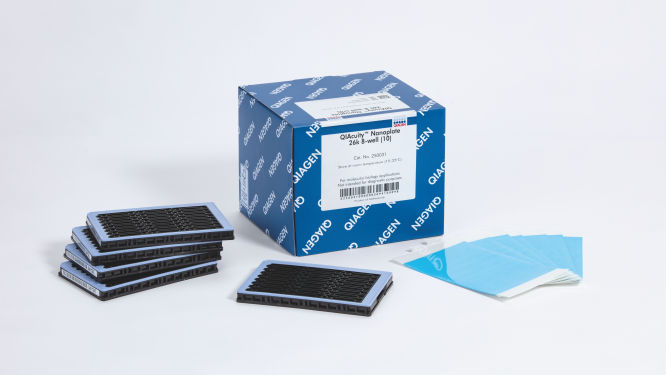
QIAcuity Nanoplate 26k 8-well (10)

N° de réf. / ID.   250031

10 QIAcuity Nanoplate 26k 8-well, 11 Nanoplate Seals
Product TypeAccessories
QIAcuity Nanoplate
Nanoplate Seals
Nanoplate Tray
Séparations par puits
26k
8.5k
Nombre de puits
8
24
Les Nanoplaques et accessoires QIAcuity sont destinés aux applications de biologie moléculaire. Ces produits ne sont pas conçus pour le diagnostic, la prévention ou le traitement des maladies.

✓ Traitement automatique des commandes en ligne 24 h/24 7 j/7

✓ Assistance technique et produits pertinente et professionnelle

✓ Commande (ou réapprovisionnement) rapide et fiable

Caractéristiques

  • Quatre nanoplaques pour différents besoins applicatifs
  • Jusqu’à 8 500 ou 26 000 partitions par puits
  • Format SBS

Détails produit

Les QIAcuity Nanoplates sont des plaques de PCR numérique microfluidiques qui permettent d’analyser 8, 24 ou 96 échantillons avec jusqu’à 8 500 ou 26 000 partitions par puits. Les quatre nanoplaques sont conçues pour fonctionner sur les instruments de PCR numérique QIAcuity.

Ces nanoplaques ne peuvent être utilisées qu’avec le QIAcuity Digital PCR System. Utilisez le QIAcuity Nanoplate Adapter pour la manipulation de liquides et la configuration de la PCR automatisées dans une QIAcuity Nanoplate sur le QIAgility. Ensuite, chargez la plaque dans le QIAcuity Digital PCR System pour la réaction de dPCR.

Souhaitez-vous en savoir plus sur ce produit et être contacté par l’un de nos spécialistes de la dPCR ? Inscrivez-vous ici, et nous vous contacterons très prochainement.

Performances

Il s’agit de plaques spécialement conçues pour les réactions de PCR numérique dans les instruments QIAcuity. QIAGEN propose quatre types de nanoplaques qui sont toutes au format SBS, mais présentent différentes spécifications pour différents besoins applicatifs.


Caractéristiques et spécifications – des nanoplaques
Type Couleur du cadre Spécifications Applications
Nanoplate 26K 8-well Bleu clair

8 puits × env. 26 000 partitions 

Réaction de dPCR de 40 µl par puits

Détection des mutations rares, 
biopsie liquide, analyse 
de l’expression génique, 
détection des agents pathogènes, etc.
Nanoplate 26K 24-well Bleu

24 puits × env. 26 000 partitions

Réaction de dPCR de 40 µl par puits

Détection des mutations rares,
biopsie liquide,
analyse de l’expression génique,
détection des agents pathogènes, etc.
Nanoplate 8,5K 24-well Blanc

24 puits × env. 8500 partitions

Réaction de dPCR de 12 µl par puits

Analyse des variations du nombre
de copies, analyse de l’expression
génique, quantification de
banques NGS, détection des
modifications du génome, etc.
Nanoplate 8,5K 96-well Gris

96 puits × env. 8500 partitions

Réaction de dPCR de 12 µl par puits

Principe

Vous pouvez obtenir, en seulement 3 étapes simples, le résultat de dPCR que vous voulez en moins de 2 heures : pipettez et chargez, effectuez l’expérience, puis analysez les résultats. Vous trouverez ici une description du principe de la réaction de dPCR sur nanoplaque.

Procédure

Comme dans les expériences de qPCR, la préparation des échantillons comprend le transfert du Master Mix, des sondes et des amorces sur une nanoplaque de 8, 24 ou 96 puits, suivi de l’ajout des échantillons. Le système intègre le partitionnement, le thermocyclage et l’imagerie dans un seul instrument entièrement automatisé qui permet aux utilisateurs de passer de l’échantillon aux résultats en moins de 2 heures. Il est possible d’effectuer l’analyse à l’aide de la suite logicielle, qui donne la concentration de la séquence cible en copies par microlitre et permet le contrôle qualité pour les échantillons positifs ou NTC. Cette analyse peut également être effectuée sur des ordinateurs à distance au sein du même réseau local (Local Area Network, LAN).

Applications

Associées avec le QIAcuity Digital PCR System et les kits de PCR QIAcuity, les QIAcuity Nanoplates facilitent les applications de PCR numérique telles que :

  • La détection des mutations rares
  • L’analyse des variations du nombre de copies
  • L’analyse de l’expression génique
  • La détection des agents pathogènes
  • Le génotypage
  • La recherche sur les miARN
  • La thérapie génique et cellulaire
  • La quantification de l’ADN résiduel
  • La surveillance des eaux usées

Ressources

Protocols (9)
Here we demonstrate how to optimize your assays on a microfluidic nanoplate-based digital PCR system, the QIAcuity, and provide recommendations for a seamless transfer. Moreover, the QIAcuity dPCR workflow is very similar to qPCR.
Here we compared the performance of qPCR and the nanoplate dPCR techniques. The digital PCR method on the QIAcuity significantly improved precision when measuring copy number states and sensitivity of mutation detection through absolute quantification and reduced standard error. This is advantageous in various applications, including copy number variation analysis, small fold-change and rare mutation detection.
The QIAgility instrument is a liquid handler designed for automating PCR setup. For compatibility with the QIAcuity, we developed an adapter to secure up to two nanoplates onto the deck of the QIAgility. Using the QIAgility software, we have optimized a protocol that works for all nanoplate types and QIAcuity applications. Here we report the performance of a front end automated QIAgility dPCR nanoplate setup procedure for use with the QIAcuity dPCR system.
Digital PCR is a superior method to qPCR for the detection and absolute quantification of low concentration target templates. There are multiple digital PCR systems on the market that differ in numerous aspects including the amount of dead volume, which is the volume that is loaded but not analyzed by the given instrument. While it has been speculated that dead volume could impact the sensitivity of dPCR applications, here we provide data to support the conclusion that the most important factors in determining the relative sensitivity of each system are template addition volume and template analyzed volume. In summary, data provided herein demonstrate that higher template addition volumes can overcome any limitations that dead volume may have on the sensitivity of a dPCR application.
This study tested a workflow for quantitation and qualification of AAV samples using a duplex assay on the QIAcuity dPCR instrument targeting both an insert (GFP) and the viral backbone (AAV2-ITR). With very low intra-assay and inter-assay CVs <6.5%, we demonstrate one of the main benefits of dPCR: reproducibility.
The goal of this work was to compare performance of quantitative PCR (qPCR) and digital PCR (dPCR) in the quantification of gene expression and Wolbachia abundances in Nasonia parasitoid wasps.
Here we provide an integrated rAAV genome titer method using the QIAcuity Digital PCR (dPCR) System with detailed parameters for high assay performance. Using this optimized method for pre-PCR handling of in-process rAAV samples, the results demonstrated that QIAcuity dPCR system generates the same level of accuracy and precision as the current gold standard ddPCR system but with much faster sample-to-result times (2 hours vs 7 hours) and higher overall throughput and scalability.
The QIAcuity digital PCR system combined with the QIAcuity One-Step Viral RT-PCR Kit enables precise detection and quantitation of vector-borne viruses in mosquitoes. The results presented in this comparison study showed that digital PCR is a powerful tool for absolute quantitation of low abundant targets and is a more reliable detection method than qPCR. Multiplexing allows detection and quantitation of multiple targets in a single reaction more efficiently by increasing sample throughput at a reduced cost per target.
Here we report the use of saliva samples in combination with dPCR as a suitable alternative to screen for individuals infected with SARS-CoV-2.
User Manuals (2)
Brochures and Guides (1)
Fast. Scalable. Reliable.
Operating software (9)
QIAcuity Control Software
REFERENCE (405.8MB)
Download

Version 2.1


Beside of improvements and bug fixes, the new features mainly address the GMP requirements by offering additional support for 21 CFR part 11 compliance and get the software ready for future Nanoplate support.

For more information, please refer to the Release Note: QIAcuity Instrument Control Software, Version 2.1.

SHA1 checksum: 0DD41A8DE46D10E81F538ACB71AC184170D39FE0

Version 3.2

The QIAcuity Control Software is an integral part of the QIAcuity instrument. It offers a GUI (graphical user interface) for basic functionalities such as plate setup, changing the order of plates to be processed, and monitoring the status of runs in real time. After a run is completed, the data are stored on the instrument’s memory and are sent to the connected QIAcuity Software Suite for analysis.

The QIAcuity instrument CSW version 3.2 has been improved with enhanced error handling to prevent subsequent errors. Furthermore, a bug effecting to operate owned plates for users with the role technician or group leader has been fixed.


Detailed information about the QIAcuity Control Software 3.2 is available in the Release Note, which can also be downloaded under section Software Release Notes.

Note: The latest CSW version 3.2 is only compatible with the Software Suite version 3.2. If only one software component is updated, no connection between the Software Suite and the CSW can be established.

Important: Please follow the instructions provided in the QIAcuity User Manual for software version 3.2 and in the Release Note.

It is strongly recommended to update the QIAcuity Software Suite first before proceeding with the QIAcuity Control Software!

Note: After clicking reboot during CSW upgrade or change of Suite connection, the login screen may appear for short period. Please ignore it and wait for the QIAcuity instrument to shut down and restart itself.

Please contact QIAGEN Technical Services if you are unsure and require technical support.

SHA256 checksum: D23713C8F1C0D6D67048A465FECF8825DBB3D4D1C6CB8C1E0B6753EE053E6B81


For Version 1.2
QIAcuity Control Software
SOFTWARE (263.6MB)
Download
Version 1.0

The QIAcuity Control Software is an integral part of the QIAcuity instrument. It offers a GUI (graphical user interface) for basic functionalities such as plate setup, changing the order of plates to be processed, and monitoring the status of runs in real time. After a run is completed, the data are stored on the instrument’s memory and are sent to the connected QIAcuity Software Suite for analysis.

This new version of the control software includes system stability and performance reliability improvements. We highly recommend to update the control software of your QIAcuity instrument.

Note: The installation requires approximately 90 minutes.
Safety Data Sheets (1)
Download Safety Data Sheets for QIAGEN product components.
Certificates of Analysis (1)

FAQ

Is it possible to change voltage set-up from 110V to 230V on the QIAcuity instruments?

This is not needed. The QIAcuity is equipped with a flexible power supply technology and operates within a range of 100–240V AC, 50/60 Hz, 1500 VA (max). 

FAQ-3761
Can I see error codes on the instrument touchscreen?

The instrument software GUI shows error codes including a description and information how to resolve the error. The instrument touchscreen shows an alarm icon in the upper right corner that turns red in case of an instrument failure. Accessing the System Status in the Tool tab allows users to clear errors. Rebooting of the instrument is required to complete the removal of the error.  Please do not skip this step. You may always contact QIAGEN Technical Services in case of any question. 

FAQ-3763
What is the scope of a regular maintenance of the QIAcuity?

The user manual contains instructions on how to perform a regular cleaning and decontamination, and how to replace air filters on the QIAcuity instruments. A regular maintenance reduces the dust in the instrument and therefore minimizes the presence of dust particles on the nanoplate, which might interfere with the plate analysis.

FAQ-3765
What is the impact of not applying the latest VPF? Can I reanalyze previously obtained results after installing the latest VPF?

If you had run a nanoplate for which the installed VPF misses the specific factor, the software will notify you. If you then analyze without the specific VPF, the impact depends on the variation of the partition volume of the new Nanoplate batch compared to the latest. Typically this variation is ±6–7% (approx. 5% CV over the entire plate). The analysis may be repeated after updating the VPF file. After installing the latest VPF and re-analysis of the run, a copy of the plate is generated in the QIAcuity Software Suite including the new results. 

FAQ-3769
Can I see on the QIAcuity Software Suite report file if the VPF (Volume Precision Factor) has been used or not?

Yes, the report includes a notification if the matching VPF was missing and, therefore, not applied to the analysis. If the matching VPF was applied there is no notification on the report. 

FAQ-3770
Is it necessary to reanalyze a plate with VPF (Volume Precision Factor) that was already processed using a QIAcuity instrument that was purchased in 2020?

If you had analyzed your nanoplates without VFP, the impact depends on the variation of the partition volume of the new nanoplate batch compared to the latest. The VPF reduces the CV from approximately 5% to 2%. We recommend to reanalyze results in case the data originated from different wells (e.g., copy number variations or gene expression data sets for which the reference sample was measured in a different well). Results obtained across different plates should also be r-analyzed. A reanalysis is not required for assay data that were analyzed within the same well (e.g., mutation rate determination using two channels within the same well).

FAQ-3771
Can I prepare a dPCR reaction directly in QIAcuity Nanoplate?

A standard PCR plate is required to set up dPCR reaction before transferring it to the nanoplate to ensure a proper mixing of the reaction mix before partitioning. 

FAQ-3774
Can I use a custom master mix instead of a QIAGEN master mix?

QIAGEN master mixes are optimized for nanoplate microfluidics and are recommended to be used with our dPCR system. They also include an optimized reference dye required for proper analysis.

FAQ-3777
How to prepare DNA prior to dPCR?

All DNA samples used in reaction mixes should show similar quality and quantity, which can easily be assessed using UV spectrophotometry. DNA samples with an average length of ≥20 kb (e.g., genomic DNA purified via spin column with silica membrane) should be fragmented by restriction digestion before partitioning. Enzymatic fragmentation of larger DNA ensures an even distribution of template throughout the QIAcuity Nanoplate, which in turn leads to an accurate and precise quantification.

FAQ-3778
What are the storage conditions and expiry date of QIAcuity consumables?

The QIAcuity Probe PCR Kit should be stored immediately upon receipt at –30 to –15°C in a constant-temperature freezer and protected from light. The QIAcuity Probe PCR master mix can also be stored protected from light at 2–8°C. Components are stable for 12 months, unless otherwise indicated on the label. 
The QIAcuity EG PCR Kit should be stored immediately upon receipt at –30 to –15°C in a constant-temperature freezer and protected from light. The QIAcuity EG PCR master mix can also be stored protected from light at 2–8°C. Components are stable for 6 months, unless otherwise indicated on the label. 
The QIAcuity Nanoplates does not have expiry date and are stable for at least 1 year when stored at RT. 

FAQ-3780
Can I use the QIAcuity Nanoplate in more than one runs?

The plate is designed for a single use run. For example, even if only 30 samples are loaded into the 96-well plate, a whole plate will be sealed by the roller. It can't be unsealed and used for another run. The QIAcuity Software won’t allow to set up a separate experiment for the same nanoplate to avoid that previously processed plates being not partitioned a second time.

FAQ-3781
Can I optimize a dPCR assay on the QIAcuity using gradient temperature?

An essential temperature gradient functionality was introduced with software version 2.5. When updating older software versions to 2.5, each QIAcuity instrument will offer the temperature gradient and may be used to find the best cycling temperature for new dPCR assays. When running a QIAcuity Four or a QIAcuity Eight, all plates may have their own temperature profile, including the option for a temperature gradient.

FAQ-3783
What is the VPF (Volume Precision Factor)?

The VPF provides a set of well-specific and molding form-specific factors used to specify the exact reaction volume of a nanoplate, thus increasing the concentration calculation of each well. 

FAQ-3784
When and how often do I need a new VPF (Volume Precision Factor)?

 In general, nanoplates provide partitions of fixed sizes that enable a very precise way of sample concentration calculation. If a new molding form is used for nanoplate manufacturing, potential variation of partition sizes can be addressed by applying the molding form-specific VPF. Thus, each time a new molding form is used, a new VPF is created and made available. Currently, the VPF is updated once every 3–6 months.

FAQ-3785
Is a standard curve needed in dPCR?

In dPCR we measure the absolute concentration of targets at endpoint reaction. Concentrations of unknowns can be determined based on dPCR results observed (number of negatives, number of positives, and partition volume analyzed).

FAQ-3786