QIAcuity EG PCR Kit

Pour utilisation avec les instruments de PCR digitale QIAcuity

S_9797_dPCR_QIAcuity_EG_PCR_Kit

✓ Traitement automatique des commandes en ligne 24 h/24 7 j/7

✓ Assistance technique et produits pertinente et professionnelle

✓ Commande (ou réapprovisionnement) rapide et fiable

QIAcuity EG PCR Kit (1 ml) icon_0368_ls_gen_eco_friendly-s

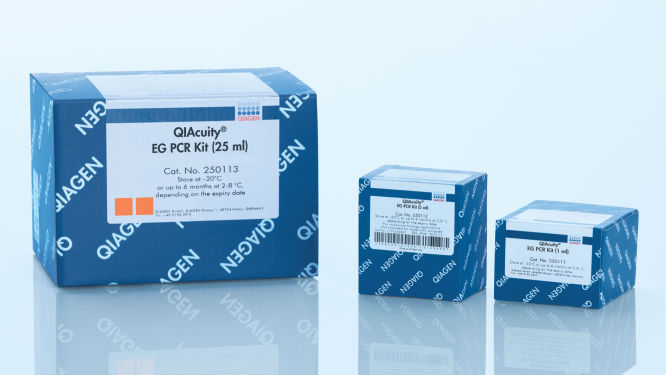
N° de réf. / ID.   250111

1 ml de QIAcuity EvaGreen Mastermix à la concentration 3x, 2 × 1,9 ml d’eau
Volume
1 ml
5 ml
25 ml
Le QIAcuity EG PCR Kit est destiné aux applications de biologie moléculaire. Ce produit n’est pas conçu pour le diagnostic, la prévention ou le traitement des maladies.

✓ Traitement automatique des commandes en ligne 24 h/24 7 j/7

✓ Assistance technique et produits pertinente et professionnelle

✓ Commande (ou réapprovisionnement) rapide et fiable

Caractéristiques

  • Pour les réactions de PCR digitale à base de colorants comprenant EvaGreen
  • Mélange principal à la concentration 3x pour charger plus d’échantillons
  • Optimisé pour les applications microfluidiques dans les QIAcuity Nanoplates
  • Conforme à REACH

Détails produit

Le QIAcuity EG PCR Kit contient un mélange principal à la concentration 3x, prêt à l’emploi et optimisé pour les applications microfluidiques dans les QIAcuity Nanoplates. Ce kit améliore la spécificité et l’efficacité de la PCR digitale à base de colorants pour assurer une analyse quantitative exacte. Un colorant intercalant EvaGreen se fixe sur l’ADN double brin et augmente l’exactitude quantitative des mesures d’ADNg ou d’ADNc sur les instruments de dPCR QIAcuity.

Ce kit fonctionne en conjonction avec le QIAcuity Digital PCR System et les QIAcuity Nanoplates.

Souhaitez-vous en savoir plus sur ce produit et être contacté par l’un de nos spécialistes de la dPCR ? Inscrivez-vous ici, et nous vous contacterons très prochainement.

Performances

Des performances supérieures
Les mélanges principaux QIAcuity pour la détection avec EvaGreen font appel aux dernières versions d’ADN polymérase QIAGEN de haute qualité. La combinaison unique entre la nouvelle ADN polymérase QuantiNova et la technologie de tampon exclusive et éprouvée de QIAGEN, optimisée pour la microfluidique des nanoplaques, fournit des résultats très homogènes en termes de sensibilité, reproductibilité et efficacité.

Détection à base de colorants avec EvaGreen
Le mélange principal spécial du QIAcuity EG PCR Kit permet d’amplifier et de quantifier avec exactitude l’ADN double brin cible. Il comprend un colorant de référence optimisé qui est nécessaire à l’analyse par dPCR et au dénombrement des partitions analysables dans les nanoplaques. De plus, EvaGreen donne un signal de fluorescence plus élevé que SYBR Green aux mêmes concentrations et assure une efficacité, une spécificité et une sensibilité d’amplification maximales dans la dPCR.

Jusqu’à 100 heures de stabilité des réactions
Les mélanges de PCR QIAcuity peuvent être stockés à 30 °C pendant 100 heures sans compromettre les performances des réactions subséquentes. Cette stabilité exceptionnelle, même après un stockage prolongé à température ambiante en l’absence d’agent refroidissant, rend le QIAcuity EG PCR Kit idéal pour la configuration de réactions et la manipulation de piles de plaques haut débit.

Principe

Le QIAcuity EG PCR Kit permet d’effectuer des analyses d’ADNc ou d’ADNg avec la plus grande spécificité grâce à un nouveau mécanisme hot start médié par anticorps. Aux basses températures, l’ADN polymérase QuantiNova DNA est conservée dans un état inactif par l’anticorps QuantiNova et un nouvel additif, le protecteur QuantiNova qui stabilise le complexe. Cela améliore la rigueur du hot start et prévient l’élongation de dimères d’amorces et d’amorces hybridées de façon non spécifique. Dans les 2 minutes qui suivent l’augmentation de la température à 95 °C, l’anticorps QuantiNova et le protecteur QuantiNova sont dénaturés et l’ADN polymérase QuantiNova est activée, permettant l’amplification par PCR.

Vous trouverez ici une description du principe de la réaction de dPCR sur nanoplaque.

Procédure

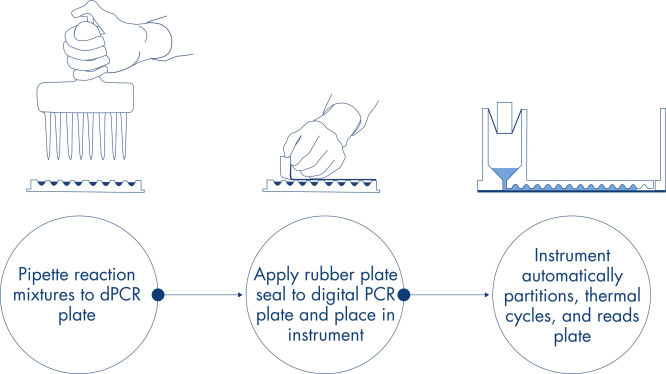
Comme dans les expériences de qPCR, la préparation des échantillons comprend le transfert du mélange principal, des sondes et des amorces sur une nanoplaque de 96 ou 24 puits, suivi de l’addition des échantillons. Le système intègre le partitionnement, le thermocyclage et l’imagerie dans un seul instrument entièrement automatisé qui permet aux utilisateurs de passer de l’échantillon aux résultats en moins de 2 heures. Il est possible d’effectuer l’analyse à l’aide de la suite logicielle, qui donne la concentration de la séquence cible en copies par microlitre et permet le contrôle qualité pour les échantillons positifs ou NTC. Cette analyse peut également être effectuée sur des ordinateurs distants au sein du même réseau local (Local Area Network, LAN).

Applications

Associé avec le QIAcuity Digital PCR System et les QIAcuity Nanoplates, le QIAcuity EG PCR Kit permet d’analyser quantitativement les cibles d’ADNc et l’ADNg pour une utilisation dans les applications telles que :

  • La détection des mutations rares
  • L’analyse des variations du nombre de copies
  • L’analyse de l’expression génique
  • La détection des agents pathogènes
  • Le génotypage
  • La recherche sur les miARN

Données et illustrations utiles

Ressources

Operating Software (14)
QIAcuity Software Suite
SOFTWARE (381MB)
Version 1.1.3
For Version 2
Version 4.0

The Volume Precision Factor (VPF) offers a unique feature to secure precision of concentration results obtained from a QIAcuity dPCR run. 
In general, Nanoplates provide partitions of fixed sizes that enable a very precise way of sample concentration calculation. Potential variation of partition sizes in Nanoplate batches, caused by different microstructure molding forms, can be addressed by applying the batch specific VPF. Furthermore, the VPF includes well-specific volume information and therefore further increases precision of concentration calculation in each well of the Nanoplates.

After downloading and updating the VPF file within the QIAcuity Software Suite, the VPF is applied automatically to the analysis of a corresponding Nanoplate batch. The VPF file includes information from all available microstructure molding forms and connected Nanoplate batches. It will be stored on the PC where the QIAcuity Software Suite is installed. 

Required QIAcuity Software Suite version: Version 1.2 or higher.

Version 2.1


Beside of usability improvements and bug fixes, the new features address GMP requirements by offering additional support for 21 CFR part 11 compliance, copy number variation (CNV) analysis, support of future Nanoplates, and improved 1D scatterplot views.

For more information, please refer to the Release Note: QIAcuity Software Suite, Version 2.1


SHA1 checksum: 6D51E273B26FA7D7E0EDA843CB3DCD74B38FA5B1


QIAcuity Control Software
SOFTWARE (401MB)
Version 2.0

The QIAcuity Control Software is an integral part of the QIAcuity instrument. It offers a GUI (graphical user interface) for basic functionalities such as plate setup, changing the order of plates to be processed, and monitoring the status of runs in real time. After a run is completed, the data are stored on the instrument’s memory and are sent to the connected QIAcuity Software Suite for analysis

Besides system stability and performance reliability improvements, this new version of the control software offers advanced user management and audit trail functionalities. Together with the QIAcuity Software Suite 2.0, the QIAcuity systems now support 21 CFR Part 11 regulations for users working under GMP.

Detailed information is available in the Release Note, which can also be downloaded under section “Operating Software”.

Note: Upgrading the QIAcuity Control Software to version 2.0 will require upgrading the QIAcuity Software Suite to version 2.0.

Important: Please follow the instructions provided in the QIAcuity User Manual for software version 2.0. It is strongly recommended to update the QIAcuity Software Suite first before proceeding with the QIAcuity Control Software!
QIAcuity Control Software
SOFTWARE (263MB)
Version 1.0

The QIAcuity Control Software is an integral part of the QIAcuity instrument. It offers a GUI (graphical user interface) for basic functionalities such as plate setup, changing the order of plates to be processed, and monitoring the status of runs in real time. After a run is completed, the data are stored on the instrument’s memory and are sent to the connected QIAcuity Software Suite for analysis.

This new version of the control software includes system stability and performance reliability improvements. We highly recommend to update the control software of your QIAcuity instrument.

Note: The installation requires approximately 90 minutes.

Version 2.0

The QIAcuity Software Suite 2.0 is designed to be installed on a Windows PC that is connected to one or more QIAcuity instruments. The QIAcuity Software Suite enables the user to set up plates, analyze results, and monitor the status of runs in real time. For this configuration, the QIAcuity instrument needs to be connected to a network through Ethernet. Alternatively, a direct cable connection between the QIAcuity and the notebook where the QIAcuity Software Suite is running needs to be established. When connected to a network, up to 10 users may access the QIAcuity Software Suite via a browser installed on the client PC (Windows or Mac).

This new software version  now supports 21 CFR Part 11 regulations for users working under GMP. This includes the following:

-Advanced User Management
-Audit Trail
-Signatures

Additional changes compared with the previous software version include the following:

-Usability improvements
-Improved dust detection
-Hyperwell expansion to CNV and GEX analysis
-CSV export functionality of multiple positive partitions for linkage analysis, drop-off assays, etc.
-Raw data export

Detailed information is available in the Release Note, which can also be downloaded under section “Operating Software”.

Important: A direct update of the Software Suite from version 1.1.3 to 2.0.20 is not possible. Please follow the instructions in the User Manual on how to update to version 1.2.18 first before updating the Software Suite to version 2.0.20.

Before you start upgrading to version 1.1.3, please make sure that all plates are imported and visible in the plate overview of the QIAcuity Software Suite.

Caution: Not following the instructions may result in a loss of your previous plate data!

Please contact QIAGEN Technical Services if you are unsure and require technical support.


SHA1 checksum
​: C60C4EEC349DF1C037796016D32A93EEC19B54A0 

Version 2.1

Version 2.1


Beside of improvements and bug fixes, the new features mainly address the GMP requirements by offering additional support for 21 CFR part 11 compliance and get the software ready for future Nanoplate support.

For more information, please refer to the Release Note: QIAcuity Instrument Control Software, Version 2.1.

SHA1 checksum: 0DD41A8DE46D10E81F538ACB71AC184170D39FE0

QIAcuity Software Suite
SOFTWARE (389MB)

Version 1.2

The QIAcuity Software Suite 1.2 is designed to be installed on a Windows PC that is connected to one or more QIAcuity instruments. The QIAcuity Software Suite enables the user to set up plates, analyze results, and monitor the status of runs in real time. For this configuration, the QIAcuity instrument needs to be connected to a network through Ethernet. Alternatively, a direct cable connection between the QIAcuity and the notebook where the QIAcuity Software Suite is running needs to be established. When connected to a network, up to 10 users may access the QIAcuity Software Suite via a browser installed on the client PC (Windows or Mac).

The following browsers are supported in the QIAcuity Software Suite:

-Mozilla Firefox (version 64.0.2 or higher)
-Microsoft Edge (version 44.17763.1.0 or higher)
-Google Chrome (version 71.0.3578.98 or higher)

The new QIAcuity Software Suite 1.2 offers a functionality that enables users of the QIAcuity Software 1.1.3 to upgrade to the new version while keeping the library of previously stored plate runs.

Note: If you have exported plates from QIAcuity Software Suite 1.1.3 that you would like to import and use in QIAcuity Software Suite 1.2, you will need to import the plates before upgrading from version 1.1.3 to version 1.2. You may then export the plates again. Future software version starting from QIAcuity Software Suite 2.0 will facilitate import of plates from previous QIAcuity Software Suite versions.

The new improvements are as follows:

-Support for the Nanoplate 8.5k 24-well
-Hyperwell functionality to combine several wells to one combined well for analysis
-Automated plate archiving functionality
-Functionality to show the number of single/double positives in 2D scatterplots
-VPF (Volume Precision Factor) to further improve concentration calculation (see related resources)
-Additional improvements for stabilization and troubleshooting

For Version 1.2
Brochures & Guides (2)
Instrument User Manuals (2)
Webinars (5)
Limitations of conventional PCR and qPCR when dealing with difficult, low-volume samples and complex mixtures with high background of competitive molecules and inhibitors have posed frequent challenges for researchers and clinicians in their routine work. With the new generation of PCR technologies, digital PCR has opened doors for diverse applications, and researchers are learning to ask questions only digital PCR can answer. Join QIAGEN's webinar on how digital PCR can help take your research applications through and beyond those challenges.
This presentation will introduce dPCR, discuss its advantages, and outline how the approach might be used to improve measurement in areas like clinical diagnosis, alone or in conjunction with other methods.
In this expert webinar, Dr. Kubista will share with you the experience he and his team have gathered at the TATAA Biocenter, developing applications and providing services using digital PCR for nearly 12 years. They have experienced all the problems common to dPCR analytical workflows and developed robust standard operating procedures to minimize the risk of error and maximize robustness and repeatability, and developed various controls to test the performance and validate the methods. He will also discuss dPCR assay design and validation and then focus on strategies for copy number determination and rare mutation detection.
The QIAGEN digital PCR technology and its expanded capability will not only transform the portfolio of conventional qPCR applications but also provide a more rapid, accurate, and sensitive method for finding answers to difficult biological questions. 
As the digital PCR technology evolves and becomes more accessible and affordable, the transition from qPCR and adoption of dPCR will hopefully no longer remain a challenge. Experts share insights in an upcoming webinar about the fully integrated, rapid, and highly flexible digital PCR portfolio from QIAGEN. 
Kit Handbooks (1)
For highly sensitive detection of miRNA using EvaGreen
Certificates of Analysis (1)

FAQ

Is it possible to change voltage set-up from 110V to 230V on the QIAcuity instruments?

This is not needed. The QIAcuity is equipped with a flexible power supply technology and operates within a range of 100–240V AC, 50/60 Hz, 1500 VA (max). 

FAQ-3761
Can I see error codes on the instrument touchscreen?

The instrument software GUI shows error codes including a description and information how to resolve the error. The instrument touchscreen shows an alarm icon in the upper right corner that turns red in case of an instrument failure. Accessing the System Status in the Tool tab allows users to clear errors. Rebooting of the instrument is required to complete the removal of the error.  Please do not skip this step. You may always contact QIAGEN Technical Services in case of any question. 

FAQ-3763
What is the scope of a regular maintenance of the QIAcuity?

The user manual contains instructions on how to perform a regular cleaning and decontamination, and how to replace air filters on the QIAcuity instruments. A regular maintenance reduces the dust in the instrument and therefore minimizes the presence of dust particles on the nanoplate, which might interfere with the plate analysis.

FAQ-3765
What is the impact of not applying the latest VPF? Can I reanalyze previously obtained results after installing the latest VPF?

If you had run a nanoplate for which the installed VPF misses the specific factor, the software will notify you. If you then analyze without the specific VPF, the impact depends on the variation of the partition volume of the new Nanoplate batch compared to the latest. Typically this variation is ±6–7% (approx. 5% CV over the entire plate). The analysis may be repeated after updating the VPF file. After installing the latest VPF and re-analysis of the run, a copy of the plate is generated in the QIAcuity Software Suite including the new results. 

FAQ-3769
Can I see on the QIAcuity Software Suite report file if the VPF (Volume Precision Factor) has been used or not?

Yes, the report includes a notification if the matching VPF was missing and, therefore, not applied to the analysis. If the matching VPF was applied there is no notification on the report. 

FAQ-3770
Is it necessary to reanalyze a plate with VPF (Volume Precision Factor) that was already processed using a QIAcuity instrument that was purchased in 2020?

If you had analyzed your nanoplates without VFP, the impact depends on the variation of the partition volume of the new nanoplate batch compared to the latest. The VPF reduces the CV from approximately 5% to 2%. We recommend to reanalyze results in case the data originated from different wells (e.g., copy number variations or gene expression data sets for which the reference sample was measured in a different well). Results obtained across different plates should also be r-analyzed. A reanalysis is not required for assay data that were analyzed within the same well (e.g., mutation rate determination using two channels within the same well).

FAQ-3771
Can I prepare a dPCR reaction directly in QIAcuity Nanoplate?

A standard PCR plate is required to set up dPCR reaction before transferring it to the nanoplate to ensure a proper mixing of the reaction mix before partitioning. 

FAQ-3774
Can I use a custom master mix instead of a QIAGEN master mix?

QIAGEN master mixes are optimized for nanoplate microfluidics and are recommended to be used with our dPCR system. They also include an optimized reference dye required for proper analysis.

FAQ-3777
How to prepare DNA prior to dPCR?

All DNA samples used in reaction mixes should show similar quality and quantity, which can easily be assessed using UV spectrophotometry. DNA samples with an average length of ≥20 kb (e.g., genomic DNA purified via spin column with silica membrane) should be fragmented by restriction digestion before partitioning. Enzymatic fragmentation of larger DNA ensures an even distribution of template throughout the QIAcuity Nanoplate, which in turn leads to an accurate and precise quantification.

FAQ-3778
What are the storage conditions and expiry date of QIAcuity consumables?

The QIAcuity Probe PCR Kit should be stored immediately upon receipt at –30 to –15°C in a constant-temperature freezer and protected from light. The QIAcuity Probe PCR master mix can also be stored protected from light at 2–8°C. Components are stable for 12 months, unless otherwise indicated on the label. 
The QIAcuity EG PCR Kit should be stored immediately upon receipt at –30 to –15°C in a constant-temperature freezer and protected from light. The QIAcuity EG PCR master mix can also be stored protected from light at 2–8°C. Components are stable for 6 months, unless otherwise indicated on the label. 
The QIAcuity Nanoplates does not have expiry date and are stable for at least 1 year when stored at RT. 

FAQ-3780
Can I use the QIAcuity Nanoplate in more than one runs?

The plate is designed for a single use run. For example, even if only 30 samples are loaded into the 96-well plate, a whole plate will be sealed by the roller. It can't be unsealed and used for another run. The QIAcuity Software won’t allow to set up a separate experiment for the same nanoplate to avoid that previously processed plates being not partitioned a second time.

FAQ-3781
Can I optimize a dPCR assay on the QIAcuity using gradient temperature?

An essential temperature gradient functionality was introduced with software version 2.5. When updating older software versions to 2.5, each QIAcuity instrument will offer the temperature gradient and may be used to find the best cycling temperature for new dPCR assays. When running a QIAcuity Four or a QIAcuity Eight, all plates may have their own temperature profile, including the option for a temperature gradient.

FAQ-3783
What is the VPF (Volume Precision Factor)?

The VPF provides a set of well-specific and molding form-specific factors used to specify the exact reaction volume of a nanoplate, thus increasing the concentration calculation of each well. 

FAQ-3784
When and how often do I need a new VPF (Volume Precision Factor)?

 In general, nanoplates provide partitions of fixed sizes that enable a very precise way of sample concentration calculation. If a new molding form is used for nanoplate manufacturing, potential variation of partition sizes can be addressed by applying the molding form-specific VPF. Thus, each time a new molding form is used, a new VPF is created and made available. Currently, the VPF is updated once every 3–6 months.

FAQ-3785
Is a standard curve needed in dPCR?

In dPCR we measure the absolute concentration of targets at endpoint reaction. Concentrations of unknowns can be determined based on dPCR results observed (number of negatives, number of positives, and partition volume analyzed).

FAQ-3786