
✓ 24/7 automatic processing of online orders
✓ Knowledgeable and professional Product & Technical Support
✓ Fast and reliable (re)-ordering
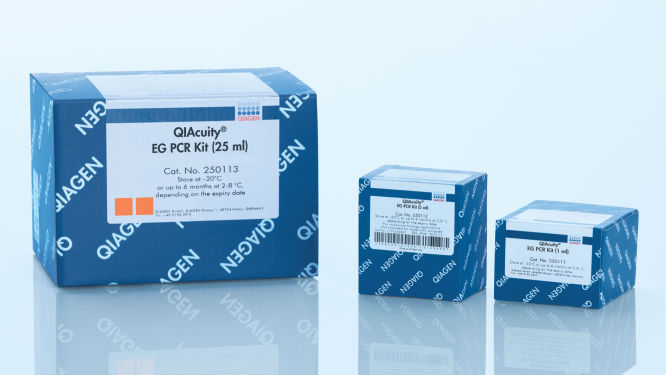
QIAcuity EG PCR Kit (1 ml) icon_0368_ls_gen_eco_friendly-s
Cat no. / ID. 250111
1 ml 3x concentrated QIAcuity EvaGreen Mastermix, 1 x 1.9 ml Water
Volume
1 ml
5 ml
25 ml
The QIAcuity EvaGreen (EG) PCR Kit is intended for molecular biology applications. This product is not intended for the diagnosis, prevention, or treatment of a disease.
✓ 24/7 automatic processing of online orders
✓ Knowledgeable and professional Product & Technical Support
✓ Fast and reliable (re)-ordering
Features
- For dye-based digital PCR reactions using EvaGreen
- 3x concentrated Master Mix for loading more sample
- Optimized for microfluidic use in QIAcuity Nanoplates
- REACH compliant
Product Details
The QIAcuity EG PCR Kit contains a 3x concentrated, ready-to-use Master Mix optimized for microfluidic use in the QIAcuity Nanoplates. The kit improves the specificity and efficiency of dye-based digital PCR to provide accurate quantitation analysis. An intercalating dye EvaGreen binds to double-stranded DNA and enhances the quantitative accuracy of gDNA or cDNA measurements on the QIAcuity dPCR instruments.
The kit works in conjunction with the QIAcuity Digital PCR System and the QIAcuity Nanoplates.
Would you like to learn more about the product and be contacted by one of our dPCR specialists? Sign in here, and we will get in touch with you shortly.
Performance
Superior performance
The QIAcuity Master Mixes for EvaGreen-based detection use the latest versions of QIAGEN’s high-quality DNA Polymerase. The unique combination of QIAGEN's proprietary and well-proven buffer technology optimized for the Nanoplate microfluidic along with the new QuantiNova DNA Polymerase delivers highly consistent results in terms of sensitivity, reproducibility and efficiency.
Dye-based detection with EvaGreen
The special master mix in the QIAcuity EG PCR Kit enables accurate double-stranded DNA target amplification and quantification. It includes an optimized reference dye needed for dPCR analysis and counting analyzable partitions in Nanoplates. Moreover, EvaGreen provides a higher fluorescence signal than SYBR Green at the same concentrations and delivers maximum amplification efficiency, specificity and sensitivity in dPCR.
Reaction stability of up to 100 hours
The QIAcuity PCR mixes can be stored at 30°C for up to 100 hours without impairing the performance of subsequent reactions. The outstanding stability, even after extended storage at room temperature without the use of any cooling agent, makes the QIAcuity EG PCR Kit ideal for high-throughput reaction setup and plate-stack handling.
Principle
The QIAcuity EG PCR Kit delivers cDNA or gDNA analysis with the highest specificity because of a novel, antibody-mediated, hot-start mechanism. At low temperatures, the QuantiNova DNA Polymerase is kept in an inactive state by the QuantiNova Antibody and a novel additive, QuantiNova Guard, that stabilizes the complex. This improves the stringency of the hot-start and prevents extension of nonspecifically annealed primers and primer–dimers. Within 2 minutes of raising the temperature to 95°C, the QuantiNova Antibody and QuantiNova Guard are denatured, and the QuantiNova DNA Polymerase is activated, enabling the PCR amplification.
The principle of the dPCR reaction in the nanoplates is described here.
Procedure
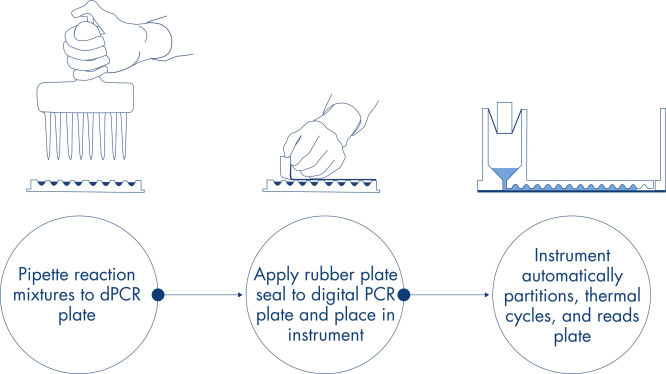
Just like in qPCR experiments, sample preparation includes the transfer of master mix, probes and primers to a 96- or 24-well nanoplate, followed by the addition of samples. The system integrates partitioning, thermocycling and imaging into a single fully automated instrument that takes users from the sample to result in under 2 hours. One can perform analysis on the Suite Software, providing the concentration in copies per microliter of your target sequence as well as for quality control such as positive samples or NTC. This analysis can also be extended to remote computers within the same local area network (LAN).
Applications
The QIAcuity EG PCR Kit, in combination with the QIAcuity Digital PCR System and the QIAcuity Nanoplates, enable quantitative analysis of cDNA targets and gDNA for use in applications, including:
- Rare mutation detection
- Copy number variation analysis
- Gene expression analysis
- Pathogen detection
- Genotyping
- miRNA research
Supporting data and figures
A simple and rapid plate-based workflow
Partitioning, thermocycling and imaging are all integrated into a single fully automated instrument, delivering results in under two hours. Nanoplate formats are amenable to front-end automation for sample preparation, further reducing hands-on time.
Resources
Brochures & Guides (2)
Certificates and labels (2)
Kit Handbooks & Protocols (3)
Operating software (9)
User Manuals (2)
Safety Data Sheets (1)
Certificates of Analysis (1)
FAQ
Is it possible to change voltage set-up from 110V to 230V on the QIAcuity instruments?
Can I see error codes on the instrument touchscreen?
What is the scope of a regular maintenance of the QIAcuity?
What is the impact of not applying the latest VPF? Can I reanalyze previously obtained results after installing the latest VPF?
Can I see on the QIAcuity Software Suite report file if the VPF (Volume Precision Factor) has been used or not?
Is it necessary to reanalyze a plate with VPF (Volume Precision Factor) that was already processed using a QIAcuity instrument that was purchased in 2020?
Can I prepare a dPCR reaction directly in QIAcuity Nanoplate?
Can I use a custom master mix instead of a QIAGEN master mix?
How to prepare DNA prior to dPCR?
What are the storage conditions and expiry date of QIAcuity consumables?
Can I use the QIAcuity Nanoplate in more than one runs?
Can I optimize a dPCR assay on the QIAcuity using gradient temperature?
What is the VPF (Volume Precision Factor)?
When and how often do I need a new VPF (Volume Precision Factor)?
Is a standard curve needed in dPCR?