- Discovery & Translational Research
- Diagnostics & Clinical Research
- Human ID & Forensics
- Next-Generation Sequencing
- Instruments & Automation
- Informatics & Data
- OEM by QIAGEN
- COVID-19
- Top Sellers
- Shop
- Workflow Configurator
- Applications & Insights Overview
- PCR
- Digital PCR
- Molecular Biology Research
- Automated Sample Preparation
- GeneGlobe Design & Analysis
- Liquid Biopsy
- Cancer Research
- Microbiome
- Human Identification and Forensics
- Infectious Disease
- TB Management
- Oncology
- Partnering for Precision Diagnostics
- Next-generation sequencing
- Genomic Services
- Informatics & Data
- Epigenomics
- OEM by QIAGEN
- Knowledge & Support Overview
- Service Solutions
- Events & Webinars
- Knowledge Hub
- Quality & Safety Data
- Product & Technical Support
- Ordering Support
- Resources
- Safety Data Sheets
Available now: New workflow design tool
Find the right products for every step of your experiment effortlessly
Smart ideas, deep insights
Get inspiring content today – with a free face mask.
QuantiFERON-TB Gold Plus
Detect TB infection with confidence.

✓ 全天候自动处理在线订单
✓ 博学专业的产品和技术支持
✓ 快速可靠的(再)订购
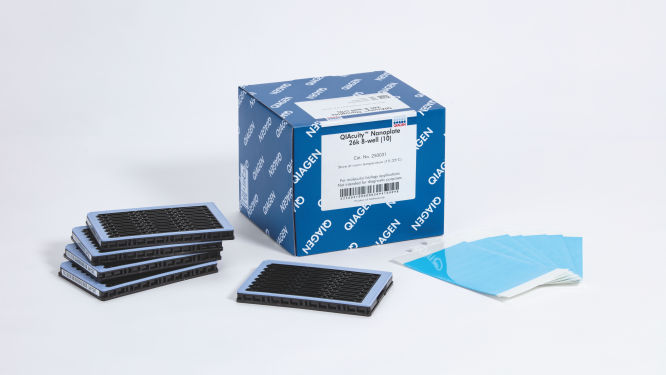
QIAcuity Nanoplate 26k 8-well (10)
目录编号 / ID. 250031
10 QIAcuity Nanoplate 26k 8-well, 11 Nanoplate Seals
Product TypeAccessories
QIAcuity Nanoplate
Nanoplate Seals
Nanoplate Tray
Nanoplate Adapter
每孔分区
26k
8.5k
孔数
8
24
QIAcuity Nanoplates 及附件 旨在用于分子生物学应用。这些产品不能用于疾病诊断、预防和治疗。
✓ 全天候自动处理在线订单
✓ 博学专业的产品和技术支持
✓ 快速可靠的(再)订购
特点
- 四款针对不同应用需求的纳米微孔板
- 每孔多达 8500 个或 26,000 个反应分区
- SBS 格式
产品详情
QIAcuity Nanoplate 是微流体数字 PCR 孔板,可让您以每孔最多 8500 个或 26,000 个反应分区运行 8 份、24 份或 96 份样本。所有四款纳米微孔板均旨在 QIAcuity 数字 PCR 仪器上运行。
这些纳米微孔板仅供与 QIAcuity Digital PCR System一起使用。使用 QIAgility 在 QIAcuity Nanoplate 中进行自动化液体处理和 PCR 反应体系构建时应使用专用的 QIAcuity Nanoplate 适配器。操作完成后,将该孔板加载到 QIAcuity Digital PCR System 上进行 dPCR 反应。
您想要进一步了解该产品并让我们的 dPCR 专家联系您吗?请在这里登记,我们将很快与您联系。
绩效
这些孔板经过专门设计,专供用于在 QIAcuity 仪器中进行数字 PCR 反应。QIAGEN 提供的纳米微孔板有四种类型,均为边合成边测序 (Sequencing by Synthesis, SBS) 格式,但规格有所不同,可满足不同的应用需求。
| 类型 | 框架颜色 | 规格 | 应用 |
| Nanoplate 26K 8-well | 浅蓝色 |
8 孔 x 大约 26,000 个反应分区 每孔 40 µL dPCR 反应体系 |
罕见突变检测、 液体活检、基因 表达分析、 病原体检测等。 |
| Nanoplate 26K 24-well | 蓝色 |
24 孔 x 大约 26,000 个反应分区 每孔 40 µL dPCR 反应体系 |
罕见突变检测、 液体活检、基因 表达分析、 病原体检测等。 |
| Nanoplate 8.5K 24-well | 白色 |
24 孔 x 大约 85,000 个反应分区 每孔 12 µL dPCR 反应体系 |
拷贝数变异 分析、基因表达 分析、NGS 文库 定量、基因编辑 检测等。 |
| Nanoplate 8.5K 96-well | 灰色 |
96 孔 x 大约 85,000 个反应分区 每孔 12 µL dPCR 反应体系 |
原理
仅需 3 个简单的步骤——移液及加载、运行实验和分析结果,您就能在 2 小时内获得 dPCR 结果。有关纳米微孔板中 dPCR 反应的原理说明,请参见这里。
程序
与 qPCR 实验一样,样本制备包括将预混液、探针和引物转移到一个 8 孔、24 孔或 96 孔纳米微孔板中,随后添加样本该系统将微分化、热循环和成像集成到单一全自动化的仪器上,使用户可在 2 小时内获得结果。您可在 Suite Software 上执行分析,该软件可针对您的靶序列及质量控制(例如阳性样本或无模板对照 [NTC])给出以每微升拷贝数表示的浓度。该分析还可在同一局域网 (LAN) 上的远程计算机上执行。
应用
QIAcity 纳米微孔板与 QlAcuity Digital PCR System 和 QIAcity PCR 试剂盒的联合使用可让您执行各种数字 PCR 应用,包括:
- 罕见突变检测
- 拷贝数变异分析
- 基因表达分析
- 病原体检测
- 基因分型
- miRNA 研究
- 细胞和基因治疗
- 残留 DNA 定量
- 废水监测
资源
Scientific documents (10)
A duplex assay for quantification and qualification of adeno-associated virus (AAV) using the QIAcuity® Digital PCR System Download
PDF (712.6KB)
This study tested a workflow for quantitation and qualification of AAV samples using a duplex assay on the QIAcuity dPCR instrument targeting both an insert (GFP) and the viral backbone (AAV2-ITR). With very low intra-assay and inter-assay CVs <6.5%, we demonstrate one of the main benefits of dPCR: reproducibility.
A front-end automation method for QIAcuity digital PCR plate setup using the QIAgility liquid handling instrument Download
PDF (1.2MB)
The QIAgility instrument is a liquid handler designed for automating PCR setup. For compatibility with the QIAcuity, we developed an adapter to secure up to two nanoplates onto the deck of the QIAgility. Using the QIAgility software, we have optimized a protocol that works for all nanoplate types and QIAcuity applications. Here we report the performance of a front end automated QIAgility dPCR nanoplate setup procedure for use with the QIAcuity dPCR system.
Assessment of the precision and sensitivity of QIAcuity nanoplate digital PCR vs. qPCR Download
PDF (933.3KB)
Here we compared the performance of qPCR and the nanoplate dPCR techniques. The digital PCR method on the QIAcuity significantly improved precision when measuring copy number states and sensitivity of mutation detection through absolute quantification and reduced standard error. This is advantageous in various applications, including copy number variation analysis, small fold-change and rare mutation detection.
Comparison of qPCR and dPCR methods for the quantification of Wolbachia densities and arthropod gene expression Download
PDF (154.2KB)
The goal of this work was to compare performance of quantitative PCR (qPCR) and digital PCR (dPCR) in the quantification of gene expression and Wolbachia abundances in Nasonia parasitoid wasps.
Impact of template addition volume and analyzed volume on digital PCR sensitivity Download
PDF (76.3KB)
Digital PCR is a superior method to qPCR for the detection and absolute quantification of low concentration target templates. There are multiple digital PCR systems on the market that differ in numerous aspects including the amount of dead volume, which is the volume that is loaded but not analyzed by the given instrument. While it has been speculated that dead volume could impact the sensitivity of dPCR applications, here we provide data to support the conclusion that the most important factors in determining the relative sensitivity of each system are template addition volume and template analyzed volume. In summary, data provided herein demonstrate that higher template addition volumes can overcome any limitations that dead volume may have on the sensitivity of a dPCR application.
Optimized in-process recombinant adeno-associated virus (rAAV) vector genome titer protocol using the QIAcuity Digital PCR System Download
PDF (143.2KB)
Here we provide an integrated rAAV genome titer method using the QIAcuity Digital PCR (dPCR) System with detailed parameters for high assay performance. Using this optimized method for pre-PCR handling of in-process rAAV samples, the results demonstrated that QIAcuity dPCR system generates the same level of accuracy and precision as the current gold standard ddPCR system but with much faster sample-to-result times (2 hours vs 7 hours) and higher overall throughput and scalability.
Here we report the use of saliva samples in combination with dPCR as a suitable alternative to screen for individuals infected with SARS-CoV-2.
Transferring and optimizing assays from quantitative PCR to digital PCR on the QIAcuity system Download
PDF (561.8KB)
Here we demonstrate how to optimize your assays on a microfluidic nanoplate-based digital PCR system, the QIAcuity, and provide recommendations for a seamless transfer. Moreover, the QIAcuity dPCR workflow is very similar to qPCR.
Vector-borne diseases identification and quantification vectored by mosquitoes using the QIAcuity Digital PCR System and qPCR Download
PDF (283.5KB)
The QIAcuity digital PCR system combined with the QIAcuity One-Step Viral RT-PCR Kit enables precise detection and quantitation of vector-borne viruses in mosquitoes. The results presented in this comparison study showed that digital PCR is a powerful tool for absolute quantitation of low abundant targets and is a more reliable detection method than qPCR. Multiplexing allows detection and quantitation of multiple targets in a single reaction more efficiently by increasing sample throughput at a reduced cost per target.
Safety Data Sheets (1)
Download Safety Data Sheets for QIAGEN product components.
Brochures & Guides (1)
Release Note: QIAcuity Software Suite Download
PDF (69.6KB)
For Version 1.2
Certificates and labels (1)
QIAcuity Digital PCR System Brochure Download
PDF (10.8MB)
Fast. Scalable. Reliable.
Operating software (10)
QIAcuity Control Software Download
ZIP (289.9MB)
Version 3.2
The QIAcuity Control Software is an integral part of the QIAcuity instrument. It offers a GUI (graphical user interface) for basic functionalities such as plate setup, changing the order of plates to be processed, and monitoring the status of runs in real time. After a run is completed, the data are stored on the instrument’s memory and are sent to the connected QIAcuity Software Suite for analysis.
The QIAcuity instrument CSW version 3.2 has been improved with enhanced error handling to prevent subsequent errors. Furthermore, a bug effecting to operate owned plates for users with the role technician or group leader has been fixed.
Detailed information about the QIAcuity Control Software 3.2 is available in the Release Note, which can also be downloaded under section Software Release Notes.
Note: The latest CSW version 3.2 is only compatible with the Software Suite version 3.2. If only one software component is updated, no connection between the Software Suite and the CSW can be established.
Important: Please follow the instructions provided in the QIAcuity User Manual for software version 3.2 and in the Release Note.
It is strongly recommended to update the QIAcuity Software Suite first before proceeding with the QIAcuity Control Software!
Note: After clicking reboot during CSW upgrade or change of Suite connection, the login screen may appear for short period. Please ignore it and wait for the QIAcuity instrument to shut down and restart itself.
Please contact QIAGEN Technical Services if you are unsure and require technical support.
SHA256 checksum: D23713C8F1C0D6D67048A465FECF8825DBB3D4D1C6CB8C1E0B6753EE053E6B81
QIAcuity Control Software Download
PDF (17.7KB)
Version 2.1.8
The QIAcuity Control Software (CSW) is an integral part of the QIAcuity instrument. It offers a GUI (graphical user interface) for basic functionalities such as plate setup, changing the order of plates to be processed, and monitoring the status of runs in real time. After a run is completed, the data are stored on the instrument’s memory and are sent to the connected QIAcuity Software Suite for analysis.
The new version 2.1.8 of the QIAcuity software (QIAcuity Software Suite version 2.1.8 and QIAcuity CSW version 2.1.8) offers bug fixes for repeated network connection issues and improved error handling. In addition, it fixes issues seen with latest versions of Microsoft Edge and Google Chrome browsers as well as issues seen with read-only plates after a software update.
Detailed information about the QIAcuity Control Software version 2.1.8 is available in the Release Note, which can also be downloaded under section “Software Release Notes”.
Note: The latest CSW version 2.1.8 is only compatible with the latest Software Suite version 2.1.8. If only one software component is updated, no connection between the Software Suite and the CSW can be established.
Important: Please follow the instructions provided in the QIAcuity User Manual for software version 2.1 and in the Release Note. It is strongly recommended to update the QIAcuity Software Suite first before proceeding with the QIAcuity Control Software!
Please contact QIAGEN Technical Services if you are unsure and require technical support.
SHA1 checksum: D3982B419D7C4CF39FBDDDAA4C0D351B39398278
QIAcuity Control Software Download
PDF (17.7KB)
Version 2.2
The QIAcuity Control Software is an integral part of the QIAcuity instrument. It offers a GUI (graphical user interface) for basic functionalities such as plate setup, changing the order of plates to be processed, and monitoring the status of runs in real time. After a run is completed, the data are stored on the instrument’s memory and are sent to the connected QIAcuity Software Suite for analysis.
The new Version 2.2 of the QIAcuity software (QIAcuity Software Suite v 2.2 and QIAcuity CSW v 2.2.) offers improvements for users working under GMP by adding a user ID validation during the report signing and the addition of timezone offset stamp for audit trail entries and for result report data. Furthermore, the addition of a standard deviation and coefficient of variance calculation in percentage of mean concentration calculation for replicates where implemented. In addition, the instrument camera stability was improved and an internal validation method was implemented.
Detailed information about the QIAcuity Control Software version 2.2 is available in the Release Note, which can also be downloaded under section “Software Release Notes”.
Note: The latest CSW version 2.2 is only compatible with the Software Suite version 2.2. If only one software component is updated, no connection between the Software Suite and the CSW can be established.
Important: Please follow the instructions provided in the QIAcuity User Manual for software version 2.2 and in the Release Note.
It is strongly recommended to update the QIAcuity Software Suite first before proceeding with the QIAcuity Control Software.
Note: After clicking reboot during CSW upgrade or change of Suite connection, login screen may appear for short period. Please ignore it and wait for the QIAcuity instrument to shut down and restart itself.
Please contact QIAGEN Technical Services if you are unsure and require technical support.
SHA1 checksum: 3892D7A434A8F072A15008C76EB088BB78F1C255
QIAcuity Control Software Download
SOFTWARE (263.6MB)
Version 1.0
The QIAcuity Control Software is an integral part of the QIAcuity instrument. It offers a GUI (graphical user interface) for basic functionalities such as plate setup, changing the order of plates to be processed, and monitoring the status of runs in real time. After a run is completed, the data are stored on the instrument’s memory and are sent to the connected QIAcuity Software Suite for analysis.
This new version of the control software includes system stability and performance reliability improvements. We highly recommend to update the control software of your QIAcuity instrument.
Note: The installation requires approximately 90 minutes.
The QIAcuity Control Software is an integral part of the QIAcuity instrument. It offers a GUI (graphical user interface) for basic functionalities such as plate setup, changing the order of plates to be processed, and monitoring the status of runs in real time. After a run is completed, the data are stored on the instrument’s memory and are sent to the connected QIAcuity Software Suite for analysis.
This new version of the control software includes system stability and performance reliability improvements. We highly recommend to update the control software of your QIAcuity instrument.
Note: The installation requires approximately 90 minutes.
QIAcuity Control Software Download
REFERENCE (405.8MB)
Version 2.1
Beside of improvements and bug fixes, the new features mainly address the GMP requirements by offering additional support for 21 CFR part 11 compliance and get the software ready for future Nanoplate support.
For more information, please refer to the Release Note: QIAcuity Instrument Control Software, Version 2.1.
SHA1 checksum: 0DD41A8DE46D10E81F538ACB71AC184170D39FE0
Release Note: QIAcuity Control Software Download
PDF (886.3KB)
Version 2.1
For Version 1.0
For Version 2.0
Release Note: QIAcuity Software Suite Download
PDF (85.8KB)
For Version 2
Release Note: QIAcuity Software Suite Download
PDF (934.8KB)
Version 2.1
User Manuals (2)
For use with QIAcuity systems
July 2021
July 2021
分析證書 (1)
常见问答
Is it possible to change voltage set-up from 110V to 230V on the QIAcuity instruments?
This is not needed. The QIAcuity is equipped with a flexible power supply technology and operates within a range of 100–240V AC, 50/60 Hz, 1500 VA (max).
FAQ-3761
Can I see error codes on the instrument touchscreen?
The instrument software GUI shows error codes including a description and information how to resolve the error. The instrument touchscreen shows an alarm icon in the upper right corner that turns red in case of an instrument failure. Accessing the System Status in the Tool tab allows users to clear errors. Rebooting of the instrument is required to complete the removal of the error. Please do not skip this step. You may always contact QIAGEN Technical Services in case of any question.
FAQ-3763
What is the scope of a regular maintenance of the QIAcuity?
The user manual contains instructions on how to perform a regular cleaning and decontamination, and how to replace air filters on the QIAcuity instruments. A regular maintenance reduces the dust in the instrument and therefore minimizes the presence of dust particles on the nanoplate, which might interfere with the plate analysis.
FAQ-3765
What is the impact of not applying the latest VPF? Can I reanalyze previously obtained results after installing the latest VPF?
If you had run a nanoplate for which the installed VPF misses the specific factor, the software will notify you. If you then analyze without the specific VPF, the impact depends on the variation of the partition volume of the new Nanoplate batch compared to the latest. Typically this variation is ±6–7% (approx. 5% CV over the entire plate). The analysis may be repeated after updating the VPF file. After installing the latest VPF and re-analysis of the run, a copy of the plate is generated in the QIAcuity Software Suite including the new results.
FAQ-3769
Can I see on the QIAcuity Software Suite report file if the VPF (Volume Precision Factor) has been used or not?
Yes, the report includes a notification if the matching VPF was missing and, therefore, not applied to the analysis. If the matching VPF was applied there is no notification on the report.
FAQ-3770
Is it necessary to reanalyze a plate with VPF (Volume Precision Factor) that was already processed using a QIAcuity instrument that was purchased in 2020?
If you had analyzed your nanoplates without VFP, the impact depends on the variation of the partition volume of the new nanoplate batch compared to the latest. The VPF reduces the CV from approximately 5% to 2%. We recommend to reanalyze results in case the data originated from different wells (e.g., copy number variations or gene expression data sets for which the reference sample was measured in a different well). Results obtained across different plates should also be r-analyzed. A reanalysis is not required for assay data that were analyzed within the same well (e.g., mutation rate determination using two channels within the same well).
FAQ-3771
Can I prepare a dPCR reaction directly in QIAcuity Nanoplate?
A standard PCR plate is required to set up dPCR reaction before transferring it to the nanoplate to ensure a proper mixing of the reaction mix before partitioning.
FAQ-3774
Can I use a custom master mix instead of a QIAGEN master mix?
QIAGEN master mixes are optimized for nanoplate microfluidics and are recommended to be used with our dPCR system. They also include an optimized reference dye required for proper analysis.
FAQ-3777
How to prepare DNA prior to dPCR?
All DNA samples used in reaction mixes should show similar quality and quantity, which can easily be assessed using UV spectrophotometry. DNA samples with an average length of ≥20 kb (e.g., genomic DNA purified via spin column with silica membrane) should be fragmented by restriction digestion before partitioning. Enzymatic fragmentation of larger DNA ensures an even distribution of template throughout the QIAcuity Nanoplate, which in turn leads to an accurate and precise quantification.
FAQ-3778
What are the storage conditions and expiry date of QIAcuity consumables?
The QIAcuity Probe PCR Kit should be stored immediately upon receipt at –30 to –15°C in a constant-temperature freezer and protected from light. The QIAcuity Probe PCR master mix can also be stored protected from light at 2–8°C. Components are stable for 12 months, unless otherwise indicated on the label.
The QIAcuity EG PCR Kit should be stored immediately upon receipt at –30 to –15°C in a constant-temperature freezer and protected from light. The QIAcuity EG PCR master mix can also be stored protected from light at 2–8°C. Components are stable for 6 months, unless otherwise indicated on the label.
The QIAcuity Nanoplates does not have expiry date and are stable for at least 1 year when stored at RT.
FAQ-3780
Can I use the QIAcuity Nanoplate in more than one runs?
The plate is designed for a single use run. For example, even if only 30 samples are loaded into the 96-well plate, a whole plate will be sealed by the roller. It can't be unsealed and used for another run. The QIAcuity Software won’t allow to set up a separate experiment for the same nanoplate to avoid that previously processed plates being not partitioned a second time.
FAQ-3781
Can I optimize a dPCR assay on the QIAcuity using gradient temperature?
An essential temperature gradient functionality was introduced with software version 2.5. When updating older software versions to 2.5, each QIAcuity instrument will offer the temperature gradient and may be used to find the best cycling temperature for new dPCR assays. When running a QIAcuity Four or a QIAcuity Eight, all plates may have their own temperature profile, including the option for a temperature gradient.
FAQ-3783
What is the VPF (Volume Precision Factor)?
The VPF provides a set of well-specific and molding form-specific factors used to specify the exact reaction volume of a nanoplate, thus increasing the concentration calculation of each well.
FAQ-3784
When and how often do I need a new VPF (Volume Precision Factor)?
In general, nanoplates provide partitions of fixed sizes that enable a very precise way of sample concentration calculation. If a new molding form is used for nanoplate manufacturing, potential variation of partition sizes can be addressed by applying the molding form-specific VPF. Thus, each time a new molding form is used, a new VPF is created and made available. Currently, the VPF is updated once every 3–6 months.
FAQ-3785
Is a standard curve needed in dPCR?
In dPCR we measure the absolute concentration of targets at endpoint reaction. Concentrations of unknowns can be determined based on dPCR results observed (number of negatives, number of positives, and partition volume analyzed).
FAQ-3786
Country and Language
Follow Us
Contact Us
This site is protected by reCAPTCHA and the Google Privacy Policy and Terms of Service apply.
Sample to Insight
© QIAGEN 2013–21. All rights reserved