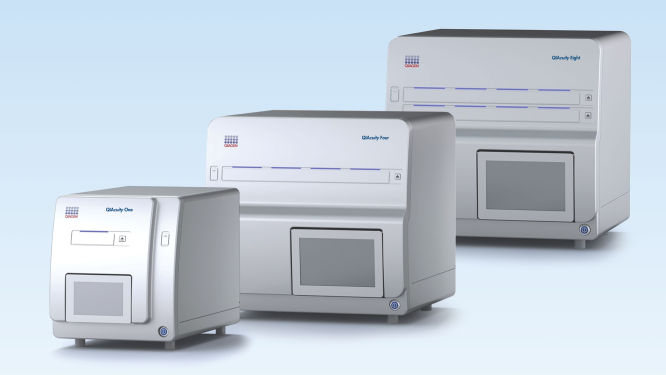
QIAcuity Digital PCR System

나노플레이트 기반 디지털 PCR 애플리케이션

가상 데모
가상 투어를 통해 이 제품에 대해 자세히 알아보고 작동하는 모습을 확인해 보세요

QIAcuity One, 2plex Device

카탈로그 번호 / ID.   911001

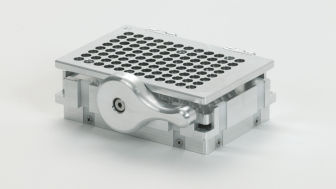
최대 2가지 형광 염료 검출용 1개 플레이트 디지털 PCR 기기, 롤러, USB 플래시 메모리 및 QIAcuity Software Suite: 1회의 예방 유지보수 방문 포함. 또한 공임, 출장 및 부품 1년 보증 포함.
형식
One
Four
Eight
다중 채널 검출
2 channels (up to 4plex)
8 channels (up to 12plex)
서비스 옵션
Device
System
System FUL-2
QIAcuity는 분자생물학 분야에 사용하기 위한 것입니다. 이 제품은 질병의 진단, 예방, 또는 치료 목적으로 사용할 수 없습니다. 따라서 임상 사용을 위한 제품의 성능 특징(즉, 진단, 예후, 치료 또는 혈액은행)은 알려져 있지 않습니다. 디지털 PCR 진단 용도의 경우, QIAcuityDx Digital PCR System을 사용하세요.
가상 데모
가상 투어를 통해 이 제품에 대해 자세히 알아보고 작동하는 모습을 확인해 보세요

특징

  • 완전 통합 시스템
  • 확장 가능 형식(1-, 4- 및 8-plate 기기)
  • 고급 멀티플렉싱 기능(최대 12플렉스)
  • LSS 염료를 위한 최대 6개의 표준 채널과 2개의 혼성 채널
  • 유연성 있는 샘플 처리량
  • 약 2시간 내에 포괄적인 결과 산출

제품 세부 정보

QIAcuity Digital PCR System은 돌연변이 검출, 복제 수 변이(Copy Number Variation, CNV), 유전자 발현 연구, 유전자 편집 분석 등에 대한 정밀하고 멀티플렉싱된 정량화 결과를 제공하도록 설계되었습니다. 이 나노플레이트 기반 시스템은 분획, 열순환(thermocycling) 및 이미징의 표준 dPCR 워크플로우를 최소한의 직접 작업 시간으로 자동화된 플랫폼에 완벽하게 통합합니다.

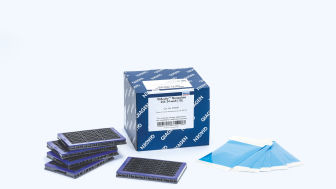
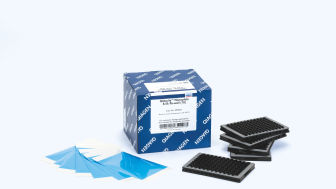
이 시스템은 QIAcuity Nanoplates, 시약, 분석과 함께 사용됩니다.

가상 데모를 통해 QIAcuity에 대해 자세히 알아보세요.

성능

QIAcuity Digital PCR System은 모든 실험실에서 절대 정량화를 합리적인 비용으로 할 수 있게 합니다. 워크어웨이 자동화는 최소한의 작업 시간으로 분획, 열순환(thermocycling) 및 이미징의 전체 디지털 PCR 워크플로우를 하나의 기기로 통합하여 간소화합니다. 또한 현재 qPCR 분석 항목을 QIAcuity Digital PCR System에 쉽게 적용할 수 있습니다. qPCR에서 전환할 때 플레이트 사용 방식에는 변화가 필요 없으므로 약 2시간 내에 빠른 분석 항목 설정과 빠른 결과를 얻을 수 있습니다.

QIAcuity 기기 - 기능 및 사양

특징 QIAcuity One 2plex QIAcuity One 5plex  QIAcuity Four QIAcuity Eight
처리 플레이트 1 1 4 8
검출 채널 2 81)
(6+2 hybrid2)
81)
(6+2 hybrid2)
81)
(6+2 hybrid2)
멀티플렉싱 기능  4 123)1)  123)1)  123)1) 
서모사이클러 1 1 1 2
결과까지 걸리는 시간 약 2시간

약 2시간

첫 번째 플레이트는 약 2시간

이후 플레이트당 약 80분

첫 번째 플레이트는 약 2시간

이후 플레이트당 약 40분

처리량(근무일 하루에 처리하는 샘플량)

최대 384개(96-well)

최대 96개(24-well)

최대 384개(96-well)

최대 96개(24-well)

최대 672개(96-well)

최대 168개(24-well)

최대 1,248개(96-well)

최대 312개(24-well)

1) 다중화 >5plex의 경우 QIAcuity High Multiplex Probe PCR Kit 사용이 필요합니다.
2) 하이브리드 채널은 Long Stokes Shift(LSS) 염료에 사용됩니다
3) 6개의 표준 채널에서 진폭 멀티플렉싱을 사용하여 12개의 표적을 병렬로 검출할 수 있습니다. 싱글 플렉스 LSS 염료와 진폭 멀티플렉싱을 위한 혼성 채널을 결합하면 가능한 총멀티플렉스 횟수가 14회로 늘어날 수 있습니다. 그러나 반응 혼합물에 사용되는 모든 분석 항목에 대한 최적화 요구와 해당 누화 보상으로 인해 이러한 결합은 권장되지 않습니다.


원리

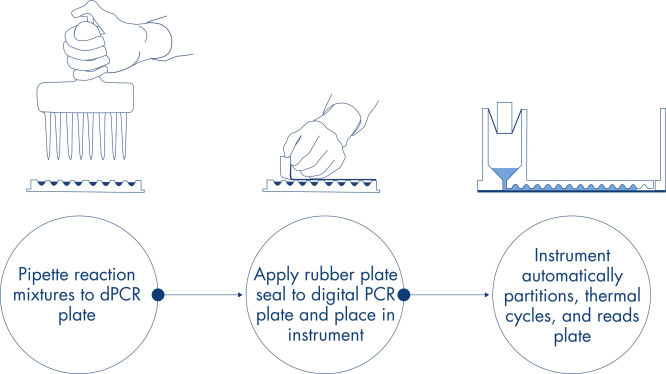
피펫팅 및 로딩, 실험 실행, 결과 분석의 간단한 3단계로 약 2시간 내에 원하는 dPCR 결과를 얻을 수 있습니다.

나노플레이트에서의 dPCR 반응 원리는 여기에 설명되어 있습니다.

절차

qPCR 실험과 마찬가지로 샘플 준비에는 마스터 믹스, 프로브 및 프라이머를 96-well 또는 24-well 나노플레이트로 옮긴 다음 샘플을 추가하는 작업이 포함됩니다. 이 시스템은 분획, 열순환, 이미징 기능을 완전 자동화된 하나의 기기에 통합하여 사용자가 2시간 이내에 샘플에서 결과를 얻을 수 있도록 합니다. 사용자는 소프트웨어 제품군에서 분석을 수행할 수 있으며, 표적 염기서열의 마이크로리터당 복제 농도뿐만 아니라 양성 샘플이나 NTC와 같은 정도 관리도 제공됩니다. 이 분석은 또한 동일한 근거리 통신망(Local Area Network, LAN) 내의 원격 컴퓨터로 확장될 수 있습니다.

응용 분야

QIAcuity 기기는 QIAcuity Nanoplates 및 QIAcuity PCR 키트와 함께 다음을 포함한 디지털 PCR 애플리케이션을 지원합니다.

  • 희귀 돌연변이 검출
  • 복제 수 변이 분석
  • 유전자 발현 분석
  • 병원체 검출
  • 유전형 분석
  • miRNA 연구
  • 세포 및 유전자 치료


소프트웨어

기기와 함께 제공되고 별도의 컴퓨터에 설치된 QIAcuity Software Suite는 한 대의 기기에 직접 연결하거나 기존 근거리 통신망(Local Area Network, LAN)을 사용하여 한 대 이상의 QIAcuity 기기를 제어합니다. QIAcuity Software Suite를 사용하여 디지털 PCR 실험, 샘플 및 반응 혼합물을 정의하고 나노플레이트에 배정하고 QIAcuity 기기로 전송할 수 있습니다. 실행 후 데이터를 분석하고 보고서를 만들고 외부 분석을 위해 데이터를 내보낼 수 있습니다. 이 소프트웨어는 반복되는 플레이트 레이아웃 또는 플레이트 실행 매개변수에 쉽게 액세스할 수 있도록 하는 여러 템플릿 기능을 제공하여 디지털 PCR 경험을 더욱 향상합니다.

LAN에 통합되면 컴퓨터가 LAN을 통해 클라이언트 역할을 하는 다른 컴퓨터에 액세스할 수 있는 서버로서 QIAcuity Software Suite 기능을 호스팅합니다. 이를 통해 여러 사용자가 여러 컴퓨터에 소프트웨어를 설치하거나 인터넷 연결을 통해 데이터에 액세스하고 교환할 필요 없이 다른 방이나 사무실에서 소프트웨어에 액세스하고 표준 브라우저를 통해 데이터를 분석할 수 있습니다.

서비스

QIAGEN의 다양한 서비스 솔루션으로 기기를 관리하세요. 요구 사항에 맞는 특정 서비스 계약에 대해 알아보세요.

지원되는 데이터 및 수치

Kits & Consumables

dPCR Kits
dPCR Assays
dPCR Accessories
QIAcuity RCL Quant Kit image
Cat. No.: 250322

서비스 계획

QIAcuity One 2plex Full Agreement

카탈로그 번호 / ID.   9245362

1년간 출장, 공임 및 부품을 포함한 현장 QIAcuity One 2plex 기기 수리. 영업일 기준 2일 대응 시간. 전체 계약 기간 동안 1회 예방 유지보수 포함.

QIAcuity One 2plex Core Agreement

카탈로그 번호 / ID.   9245358

1년간 출장, 공임 및 예비 부품을 포함한 1회 현장 수리 서비스 및 1회 현장 예방 유지보수. 영업일 기준 5일 대응 시간. 계약 기간 동안 추가 수리 서비스에 대한 10% 할인 포함.

QIAcuity One 5plex Core Agreement

카탈로그 번호 / ID.   9245359

1년간 출장, 공임 및 예비 부품을 포함한 1회 현장 수리 서비스 및 1회 현장 예방 유지보수. 영업일 기준 5일 대응 시간. 계약 기간 동안 추가 수리 서비스에 대한 10% 할인 포함.

QIAcuity Four Core Agreement

카탈로그 번호 / ID.   9245360

1년간 출장, 공임 및 예비 부품을 포함한 1회 현장 수리 서비스 및 1회 현장 예방 유지보수. 영업일 기준 5일 대응 시간. 계약 기간 동안 추가 수리 서비스에 대한 10% 할인 포함.

QIAcuity Eight Core Agreement

카탈로그 번호 / ID.   9245361

1년간 출장, 공임 및 예비 부품을 포함한 1회 현장 수리 서비스 및 1회 현장 예방 유지보수. 영업일 기준 5일 대응 시간. 계약 기간 동안 추가 수리 서비스에 대한 10% 할인 포함.

QIAcuity One 5plex Full Agreement

카탈로그 번호 / ID.   9245363

1년간 출장, 공임 및 부품을 포함한 현장 QIAcuity One 5plex 기기 수리. 영업일 기준 2일 대응 시간. 전체 계약 기간 동안 1회 예방 유지보수 포함.

QIAcuity Four Full Agreement

카탈로그 번호 / ID.   9245364

1년간 출장, 공임 및 부품을 포함한 현장 QIAcuity Four 기기 수리. 영업일 기준 2일 대응 시간. 전체 계약 기간 동안 1회 예방 유지보수 포함.

QIAcuity Eight Full Agreement

카탈로그 번호 / ID.   9245365

1년간 출장, 공임 및 부품을 포함한 현장 QIAcuity Eight 기기 수리. 영업일 기준 2일 대응 시간. 전체 계약 기간 동안 1회 예방 유지보수 포함.

FAQ

Is it possible to change voltage set-up from 110V to 230V on the QIAcuity instruments?

This is not needed. The QIAcuity is equipped with a flexible power supply technology and operates within a range of 100–240V AC, 50/60 Hz, 1500 VA (max). 

FAQ-3761
Can I see error codes on the instrument touchscreen?

The instrument software GUI shows error codes including a description and information how to resolve the error. The instrument touchscreen shows an alarm icon in the upper right corner that turns red in case of an instrument failure. Accessing the System Status in the Tool tab allows users to clear errors. Rebooting of the instrument is required to complete the removal of the error.  Please do not skip this step. You may always contact QIAGEN Technical Services in case of any question. 

FAQ-3763
What is the scope of a regular maintenance of the QIAcuity?

The user manual contains instructions on how to perform a regular cleaning and decontamination, and how to replace air filters on the QIAcuity instruments. A regular maintenance reduces the dust in the instrument and therefore minimizes the presence of dust particles on the nanoplate, which might interfere with the plate analysis.

FAQ-3765
What is the impact of not applying the latest VPF? Can I reanalyze previously obtained results after installing the latest VPF?

If you had run a nanoplate for which the installed VPF misses the specific factor, the software will notify you. If you then analyze without the specific VPF, the impact depends on the variation of the partition volume of the new Nanoplate batch compared to the latest. Typically this variation is ±6–7% (approx. 5% CV over the entire plate). The analysis may be repeated after updating the VPF file. After installing the latest VPF and re-analysis of the run, a copy of the plate is generated in the QIAcuity Software Suite including the new results. 

FAQ-3769
Can I see on the QIAcuity Software Suite report file if the VPF (Volume Precision Factor) has been used or not?

Yes, the report includes a notification if the matching VPF was missing and, therefore, not applied to the analysis. If the matching VPF was applied there is no notification on the report. 

FAQ-3770
Is it necessary to reanalyze a plate with VPF (Volume Precision Factor) that was already processed using a QIAcuity instrument that was purchased in 2020?

If you had analyzed your nanoplates without VFP, the impact depends on the variation of the partition volume of the new nanoplate batch compared to the latest. The VPF reduces the CV from approximately 5% to 2%. We recommend to reanalyze results in case the data originated from different wells (e.g., copy number variations or gene expression data sets for which the reference sample was measured in a different well). Results obtained across different plates should also be r-analyzed. A reanalysis is not required for assay data that were analyzed within the same well (e.g., mutation rate determination using two channels within the same well).

FAQ-3771
Can I prepare a dPCR reaction directly in QIAcuity Nanoplate?

A standard PCR plate is required to set up dPCR reaction before transferring it to the nanoplate to ensure a proper mixing of the reaction mix before partitioning. 

FAQ-3774
Can I use a custom master mix instead of a QIAGEN master mix?

QIAGEN master mixes are optimized for nanoplate microfluidics and are recommended to be used with our dPCR system. They also include an optimized reference dye required for proper analysis.

FAQ-3777
How to prepare DNA prior to dPCR?

All DNA samples used in reaction mixes should show similar quality and quantity, which can easily be assessed using UV spectrophotometry. DNA samples with an average length of ≥20 kb (e.g., genomic DNA purified via spin column with silica membrane) should be fragmented by restriction digestion before partitioning. Enzymatic fragmentation of larger DNA ensures an even distribution of template throughout the QIAcuity Nanoplate, which in turn leads to an accurate and precise quantification.

FAQ-3778
What are the storage conditions and expiry date of QIAcuity consumables?

The QIAcuity Probe PCR Kit should be stored immediately upon receipt at –30 to –15°C in a constant-temperature freezer and protected from light. The QIAcuity Probe PCR master mix can also be stored protected from light at 2–8°C. Components are stable for 12 months, unless otherwise indicated on the label. 
The QIAcuity EG PCR Kit should be stored immediately upon receipt at –30 to –15°C in a constant-temperature freezer and protected from light. The QIAcuity EG PCR master mix can also be stored protected from light at 2–8°C. Components are stable for 6 months, unless otherwise indicated on the label. 
The QIAcuity Nanoplates does not have expiry date and are stable for at least 1 year when stored at RT. 

FAQ-3780
Can I use the QIAcuity Nanoplate in more than one runs?

The plate is designed for a single use run. For example, even if only 30 samples are loaded into the 96-well plate, a whole plate will be sealed by the roller. It can't be unsealed and used for another run. The QIAcuity Software won’t allow to set up a separate experiment for the same nanoplate to avoid that previously processed plates being not partitioned a second time.

FAQ-3781
Can I optimize a dPCR assay on the QIAcuity using gradient temperature?

An essential temperature gradient functionality was introduced with software version 2.5. When updating older software versions to 2.5, each QIAcuity instrument will offer the temperature gradient and may be used to find the best cycling temperature for new dPCR assays. When running a QIAcuity Four or a QIAcuity Eight, all plates may have their own temperature profile, including the option for a temperature gradient.

FAQ-3783
What is the VPF (Volume Precision Factor)?

The VPF provides a set of well-specific and molding form-specific factors used to specify the exact reaction volume of a nanoplate, thus increasing the concentration calculation of each well. 

FAQ-3784
When and how often do I need a new VPF (Volume Precision Factor)?

 In general, nanoplates provide partitions of fixed sizes that enable a very precise way of sample concentration calculation. If a new molding form is used for nanoplate manufacturing, potential variation of partition sizes can be addressed by applying the molding form-specific VPF. Thus, each time a new molding form is used, a new VPF is created and made available. Currently, the VPF is updated once every 3–6 months.

FAQ-3785
Is a standard curve needed in dPCR?

In dPCR we measure the absolute concentration of targets at endpoint reaction. Concentrations of unknowns can be determined based on dPCR results observed (number of negatives, number of positives, and partition volume analyzed).

FAQ-3786